Small website, real operating system
The brief was “a lead-generation website that shows the portfolio”. The website is the small part. The interesting work is the workspace behind it: every website enquiry lands there, moves through a sales pipeline, becomes a project with phases and payment milestones, and is worked on by a team whose permissions match their jobs.
The studio started with a logo, project photos in a Google Drive folder and a founder's WhatsApp. There was no website and no record of enquiries. Within a day of the real photos arriving, both the site and the workspace were live on the studio's domain.
Every section has one job
It is a single page. The first version used stock photos and twelve made-up projects as stand-ins. Once the founder sent the real work, the whole portfolio became four real homes and 26 photos, and no stock imagery remained anywhere on the site.
| Section | Its job | The detail that does it |
|---|---|---|
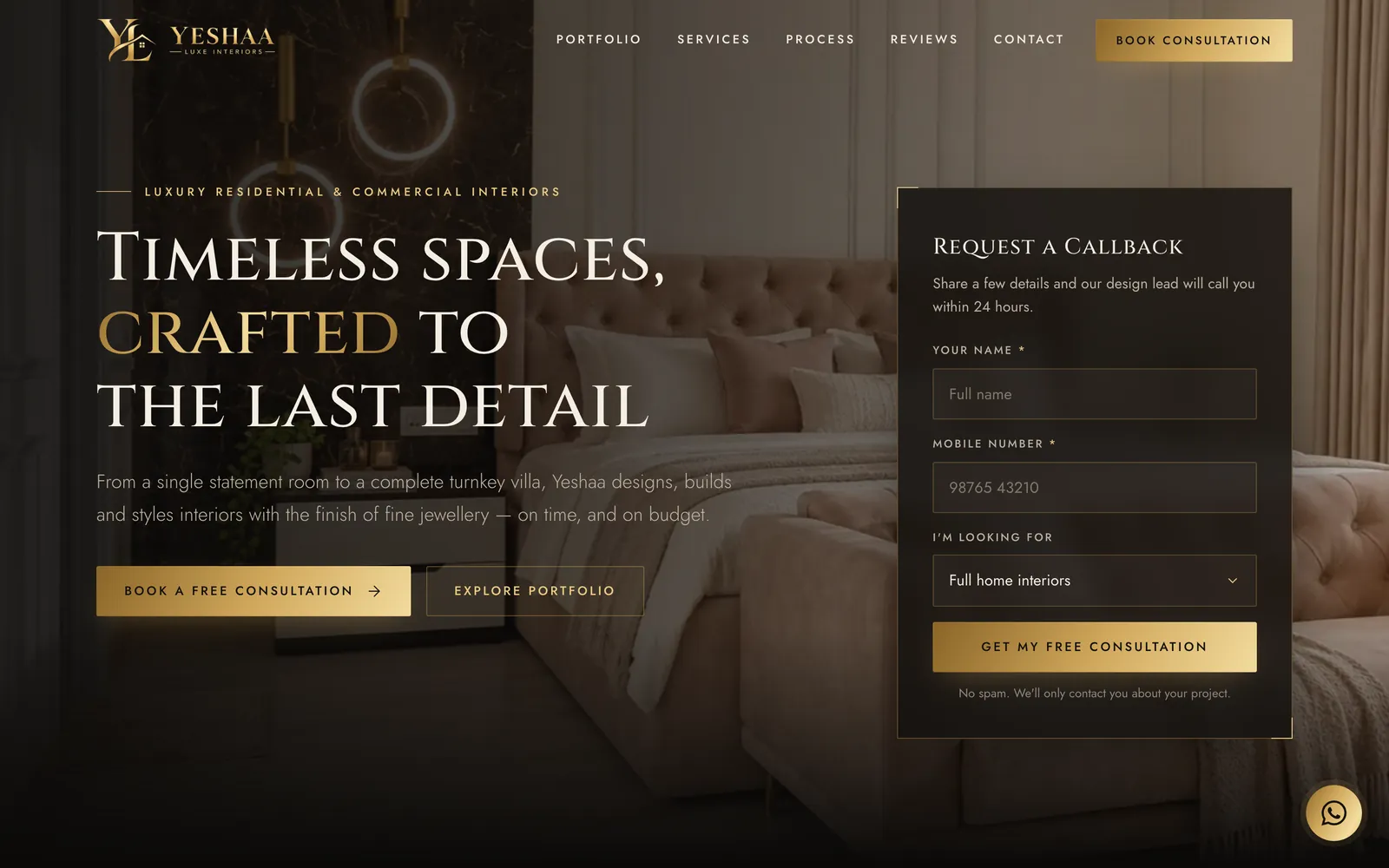
| Hero | Make a first impression worthy of a luxury studio, and capture an enquiry above the fold | A callback card with name, mobile and “I'm looking for”, and a promise of a call within 24 hours. The background is the studio's own work. |
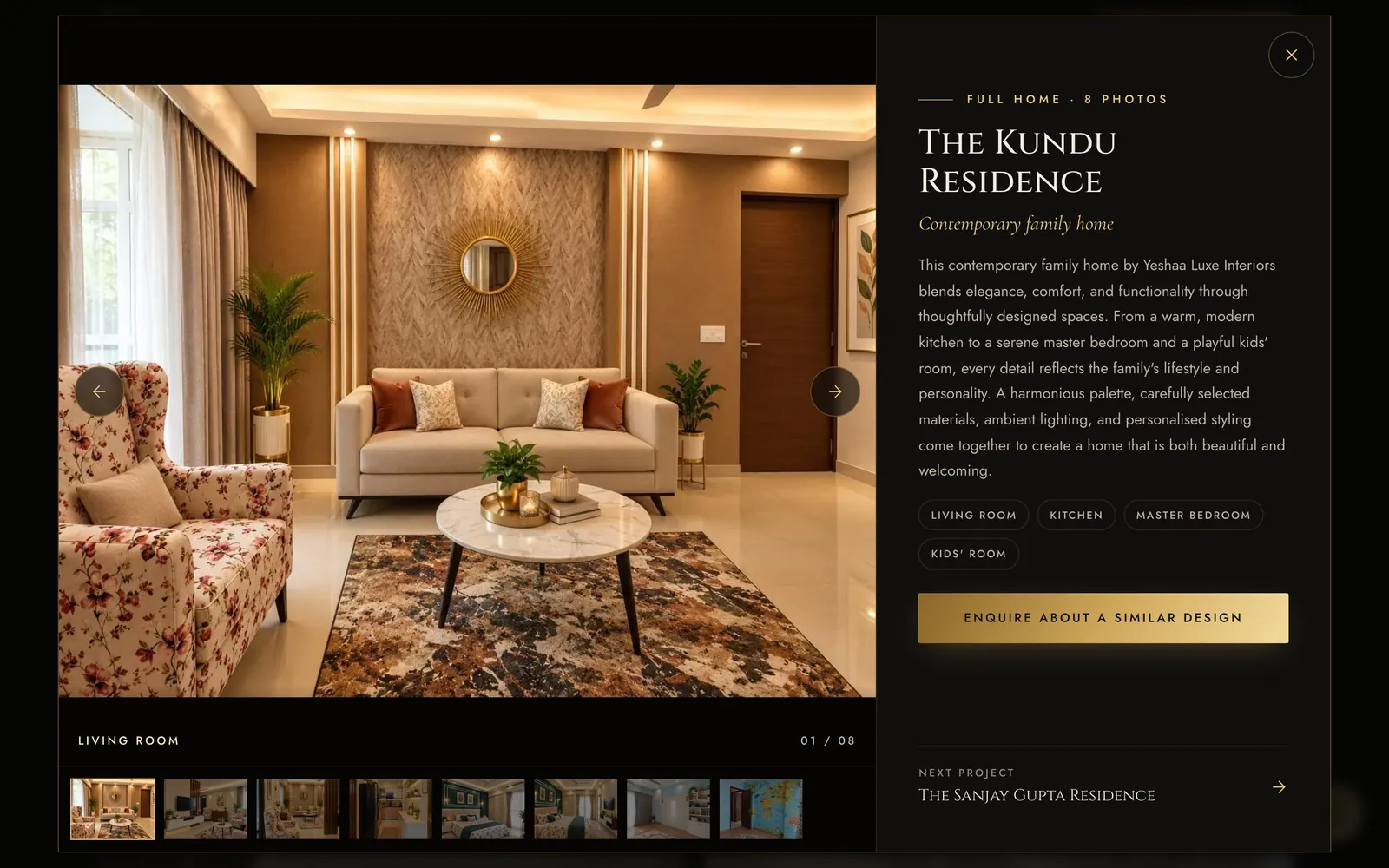
| Selected works | Proof | Four real projects. Each opens a gallery with room captions and a write-up, and has its own link (#project-…) to share on WhatsApp or Instagram. |
| In the gallery | Turn admiration into an enquiry | “Enquire about a similar design” fills in the form with that project, so the studio knows which look the visitor responded to. |
| Services | Show the scope in one glance | Six cards: residential, turnkey execution, kitchens and wardrobes, commercial, 3D visualisation, décor and styling. |
| The Yeshaa difference | Answer “why pay more?” | Four proof points: one team from concept to keys, itemised quotes, verified materials, on-time handover. |
| Process | Make a big purchase feel manageable | Four steps: consultation → concept and 3D → build → styling and handover. |
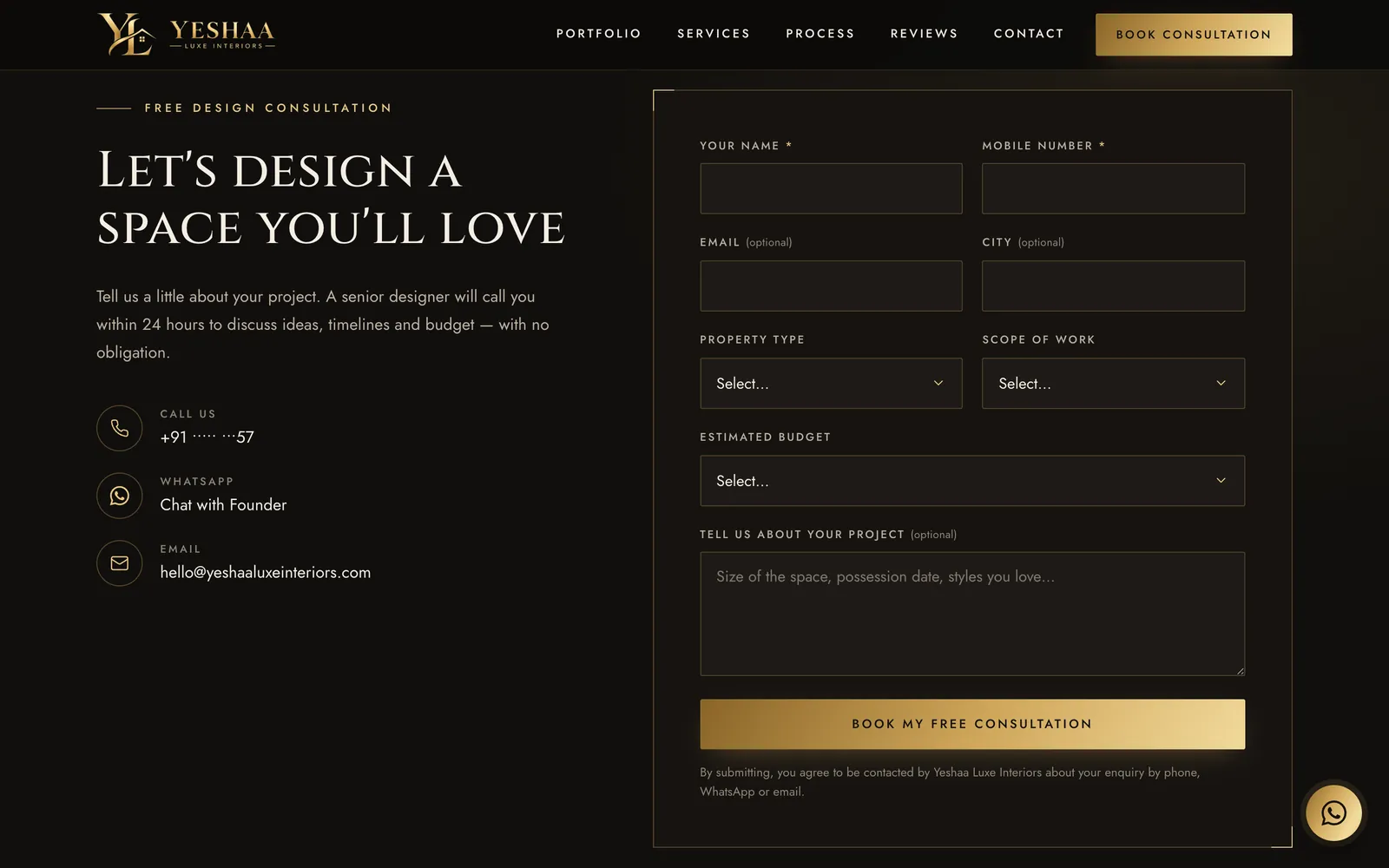
| Enquire | Capture the rest | Only name and mobile are required. Everything else (city, property type, scope, budget, message) is optional, so a short enquiry is never lost because a long form put someone off. |
| Always visible | Make contact easy from anywhere on the page | On phones, a sticky Call / WhatsApp / Free consultation bar. WhatsApp is labelled “Chat with Founder”, not “Chat with a designer”: at this size, the founder is the brand. |
What happens when someone submits
- It goes straight into the workspace. The form posts to
workspace.<domain>/api/public/leadswith the ad tags (UTM, gclid, fbclid), the referring site, the page and which form was used, and records agenerate_leadanalytics event. - Repeat enquiries merge. If that phone number already has an open lead, the new enquiry is added to it (“Enquired again via…”) instead of creating a duplicate.
- Failure has a fallback. If the workspace can't be reached, the visitor is asked to call or WhatsApp instead. The enquiry is never silently dropped.
- Spam handled quietly. A hidden honeypot field gets a fake success, submissions are limited to 12 a minute per IP, and only the studio's own domains may post.
Design language
The colours are sampled from the logo: near-black and a metallic gold ramp on ivory. Headings are set in Cinzel, which echoes the wordmark's classical capitals, with Cormorant Garamond italic for quotes and Jost for body text. The design guidance tool I used suggested black and white; I overruled it to keep the logo's gold, and kept its font pairing and its form-led layout.
From enquiry to handover, in one calm place
The workspace has two jobs: an inbox and pipeline for enquiries, and delivery tracking once a lead becomes a project.
| Screen | What it does | The decision behind it |
|---|---|---|
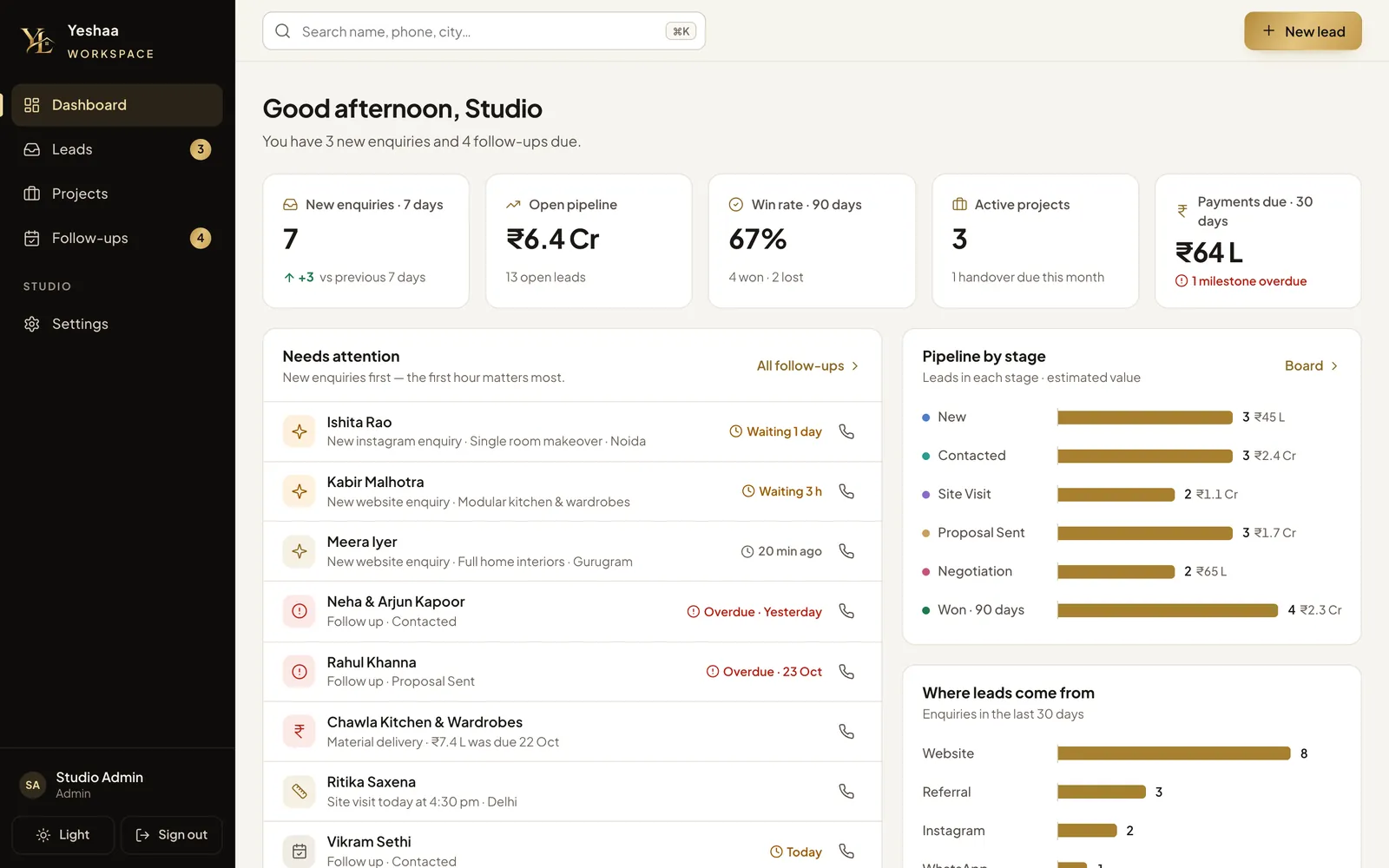
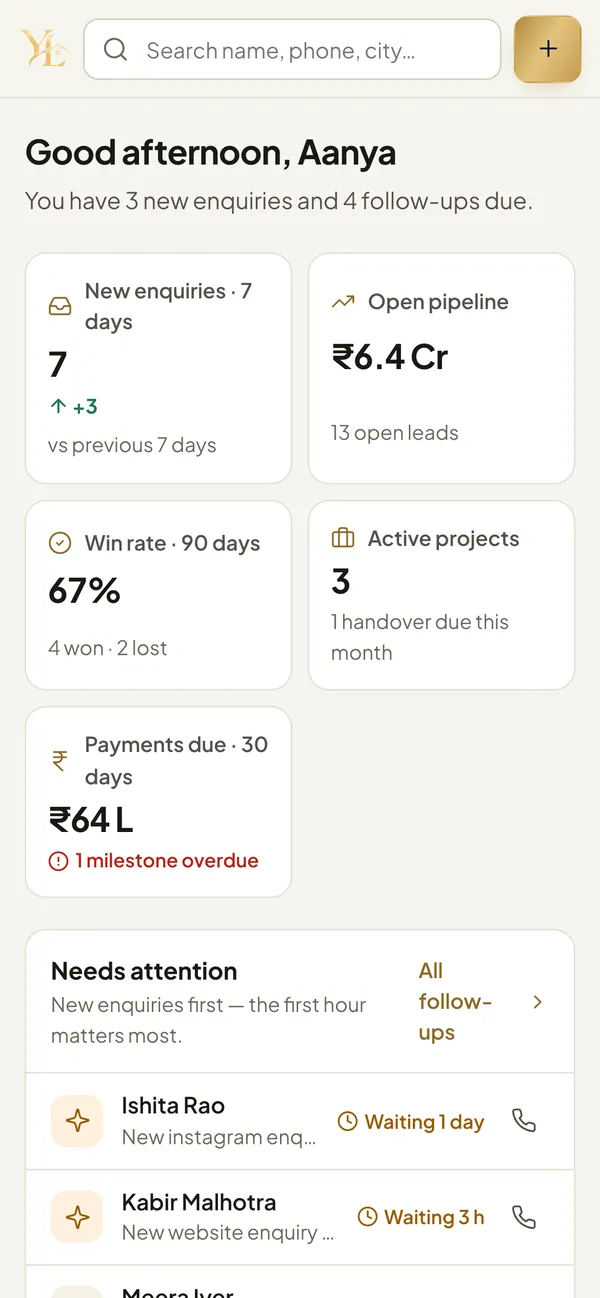
| Dashboard | Five KPIs: new enquiries (against the previous week), open pipeline in ₹, 90-day win rate, active projects, payments due in the next 30 days | Every number answers a question the founder asks on Monday morning. Overdue items show in red. |
| Leads board and list | New → Contacted → Site Visit → Proposal Sent → Negotiation → Won / Lost. Drag cards between stages; each column shows its ₹ total. | New enquiries waiting more than an hour are flagged (“Waiting 3 h”). Losing a lead requires one of seven reasons, so lost deals can be learned from. |
| Lead drawer | One-tap call, WhatsApp with a pre-written message, and email. A stage stepper, follow-up and site-visit dates, value, owner, and where the lead came from. | Logging a call or WhatsApp on a new lead moves it to Contacted automatically, so the board reflects what actually happened. |
| Convert to project | Creates the project with a 10 / 40 / 40 / 10 payment plan, a 90-day target handover, and the lead's owner as lead designer | The lead is marked Won only after the project and its payments exist, so a conversion can never be half-done. |
| Project page | Seven phases (Booking → Design → Final Quote → Production → Site Execution → Handover → Completed), each with a checklist, plus payment milestones and a site log | The phase checklists are the studio's real steps, such as “Mood board approved” and “Final BOQ prepared” (the bill of quantities). |
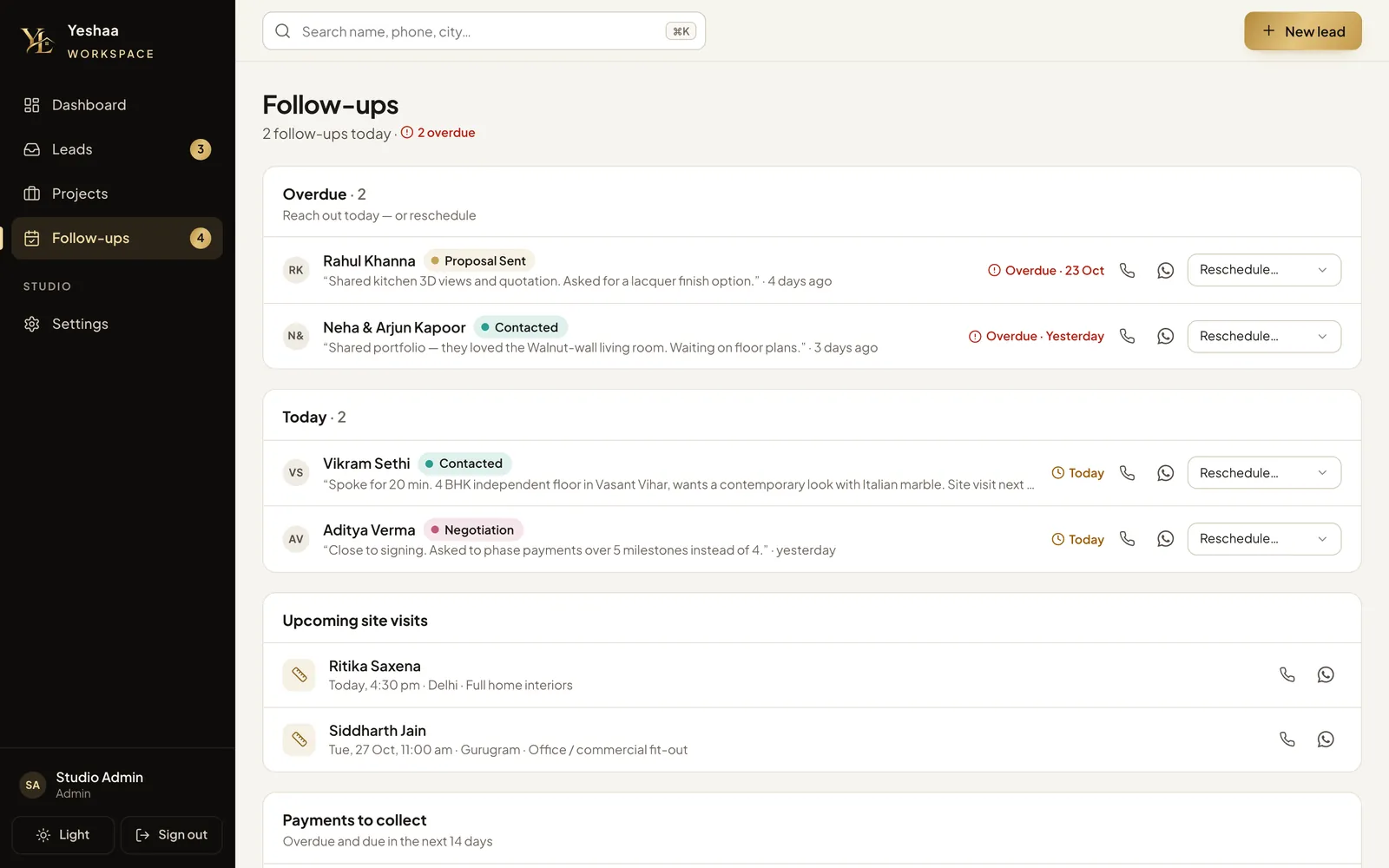
| Follow-ups | Overdue, today, next 7 days, site visits, payments to collect, and open leads with no next step | “No next step set” is its own list, because that is how leads are quietly lost. |
| Search | ⌘K across leads and projects by name, phone, city or email | A client calls, and you find them before they finish saying hello. |
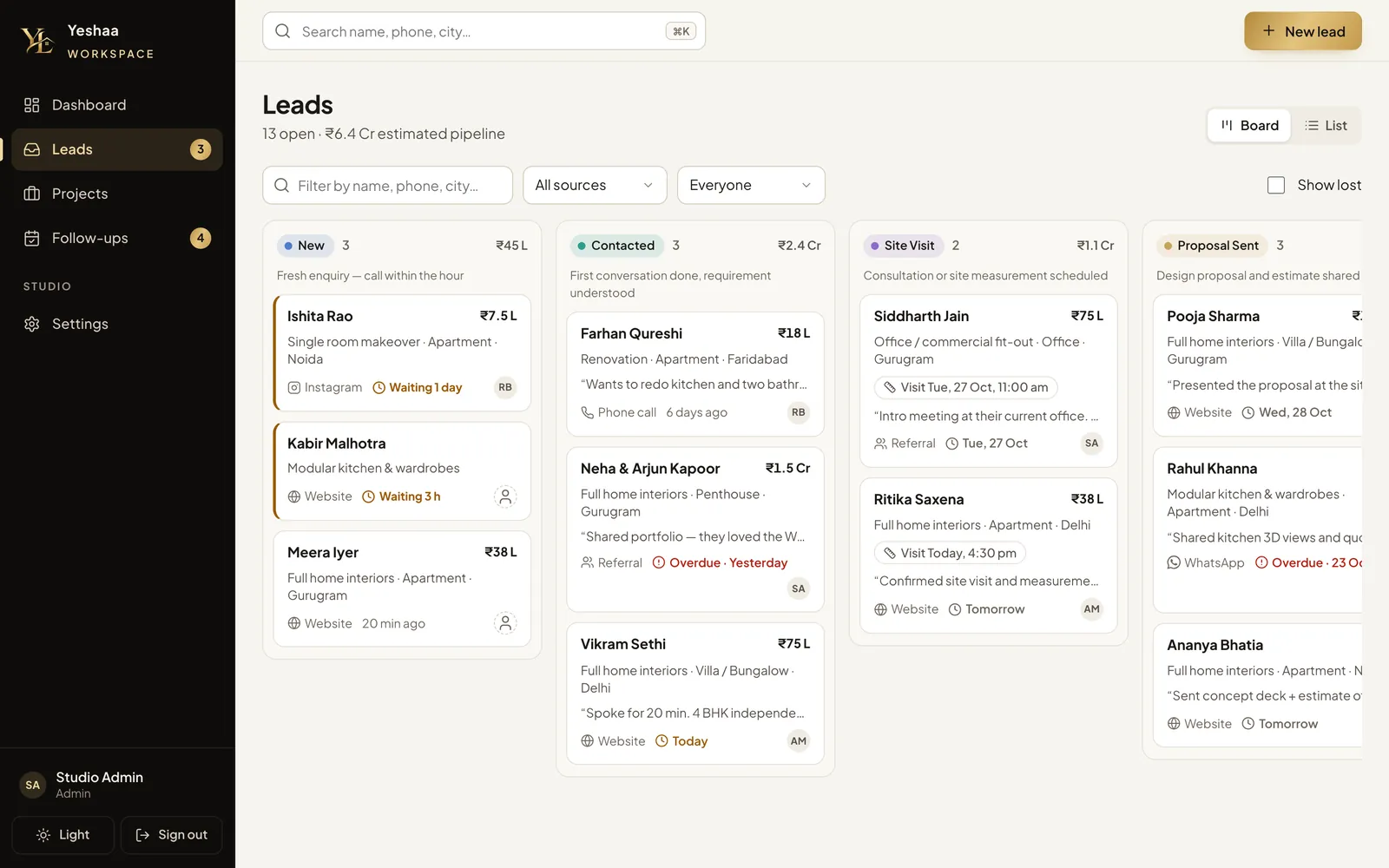
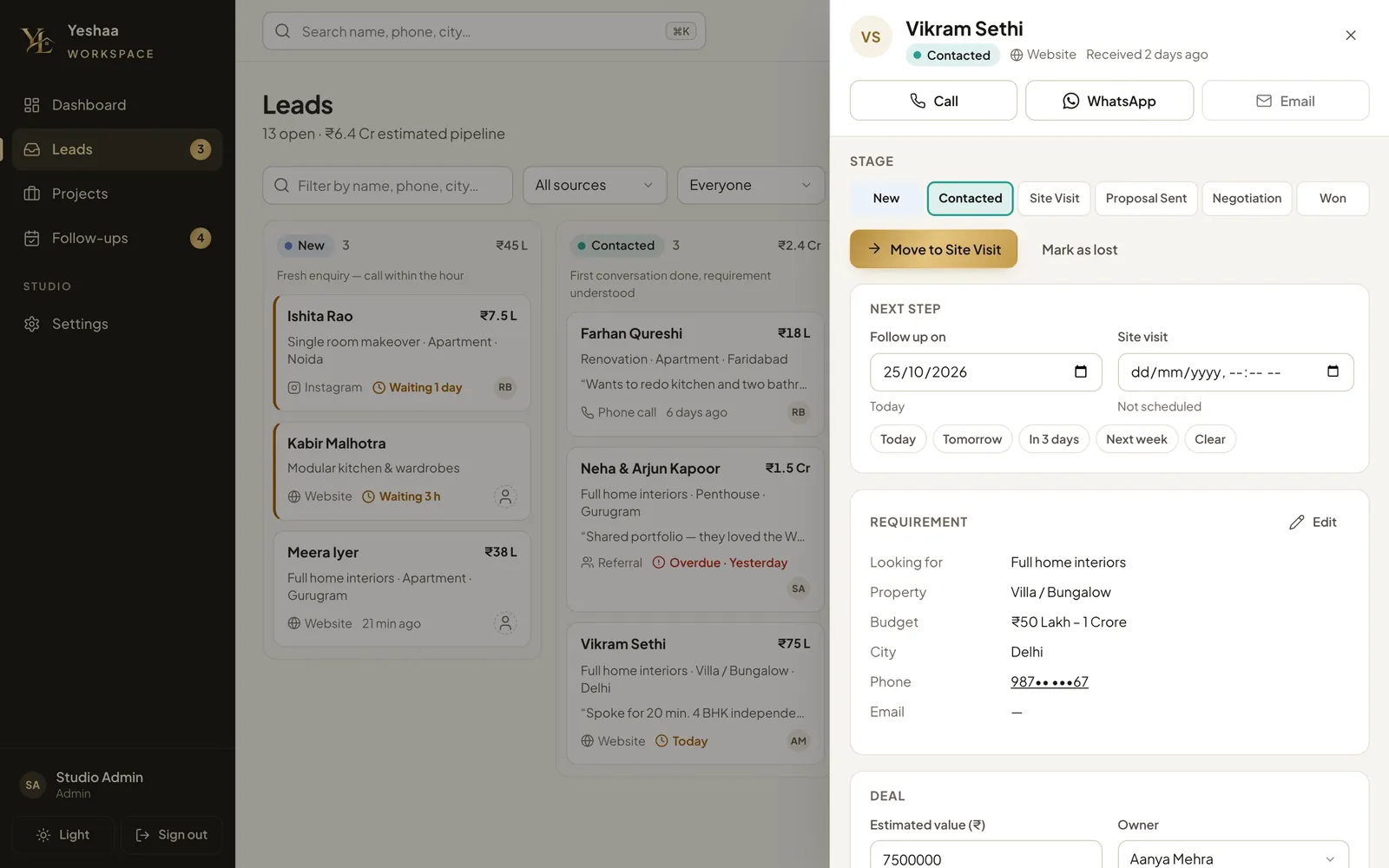
The stages, phases, checklists, payment plan, lead sources, loss reasons, roles and permissions all live in one file, lifecycle.js, which both the server and the browser import. Changing the studio's process means editing one list, and what the screen shows can't drift from what the server enforces.
Read is open; write follows the job
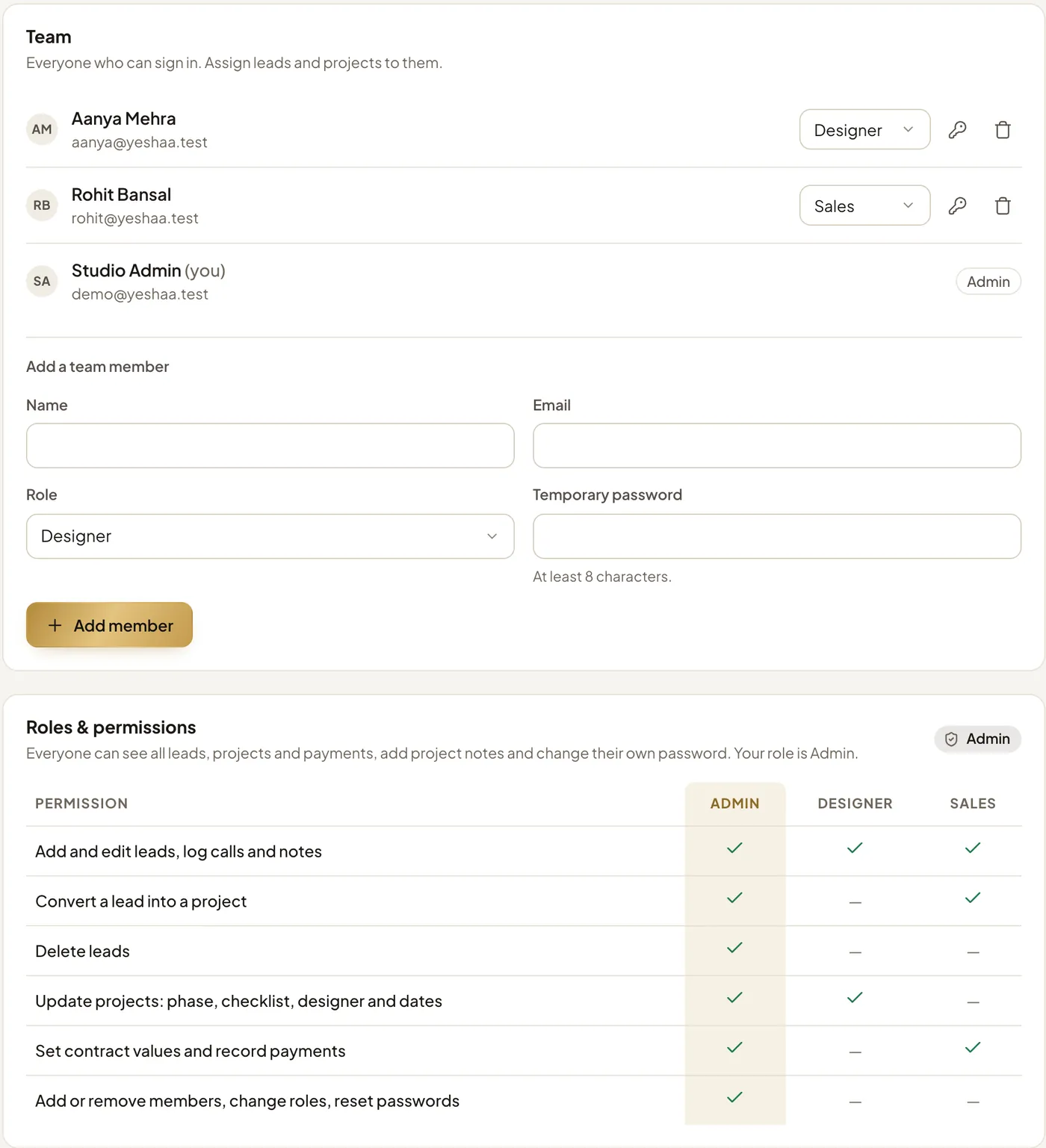
Three roles (Admin, Sales and Designer) and six permissions. The model rests on one idea: money is guarded separately. Sales set the contract value and record payments. Designers run the project. Only admins do both.
| Permission | Admin | Sales | Designer |
|---|---|---|---|
| Add and edit leads, log calls and notes | ✓ yes | ✓ yes | ✓ yes |
| Convert a lead into a project (mark it Won) | ✓ yes | ✓ yes | — no |
| Delete leads | ✓ yes | — no | — no |
| Update projects: phase, checklist, designer and dates | ✓ yes | — no | ✓ yes |
| Set contract values and record payments | ✓ yes | ✓ yes | — no |
| Add or remove members, change roles, reset passwords | ✓ yes | — no | — no |
The rules behind the matrix
Everyone can read everything
All members see every lead, project and payment, can add project notes and can change their own password. In a small studio everyone needs the context. A lead's owner is who is responsible for it, not a wall around it.
The server is the gate
Every API route declares who may call it: anyone, any signed-in member, or a named permission. A disallowed call gets a 403 (“Your role can't do that — ask an admin”), whatever the screen showed.
Checked field by field
When a project is saved, only the fields that actually changed are checked. Contract value needs payments.manage; anything else needs projects.edit. So Sales can price a project but not move its phase, and a designer can do the reverse.
The screen says why
The same can() function hides or disables what a role can't do, and explains it in plain words rather than greying out a button with no reason.
Changes apply on the next click
The role is read again from the database on every request, so promoting or demoting someone takes effect at once, with no sign-out needed.
Guard-rails
Nobody can change their own role or remove themselves, so there is always an admin. A lead that has a project can't be deleted. Removing a member ends their sessions and unassigns their work.
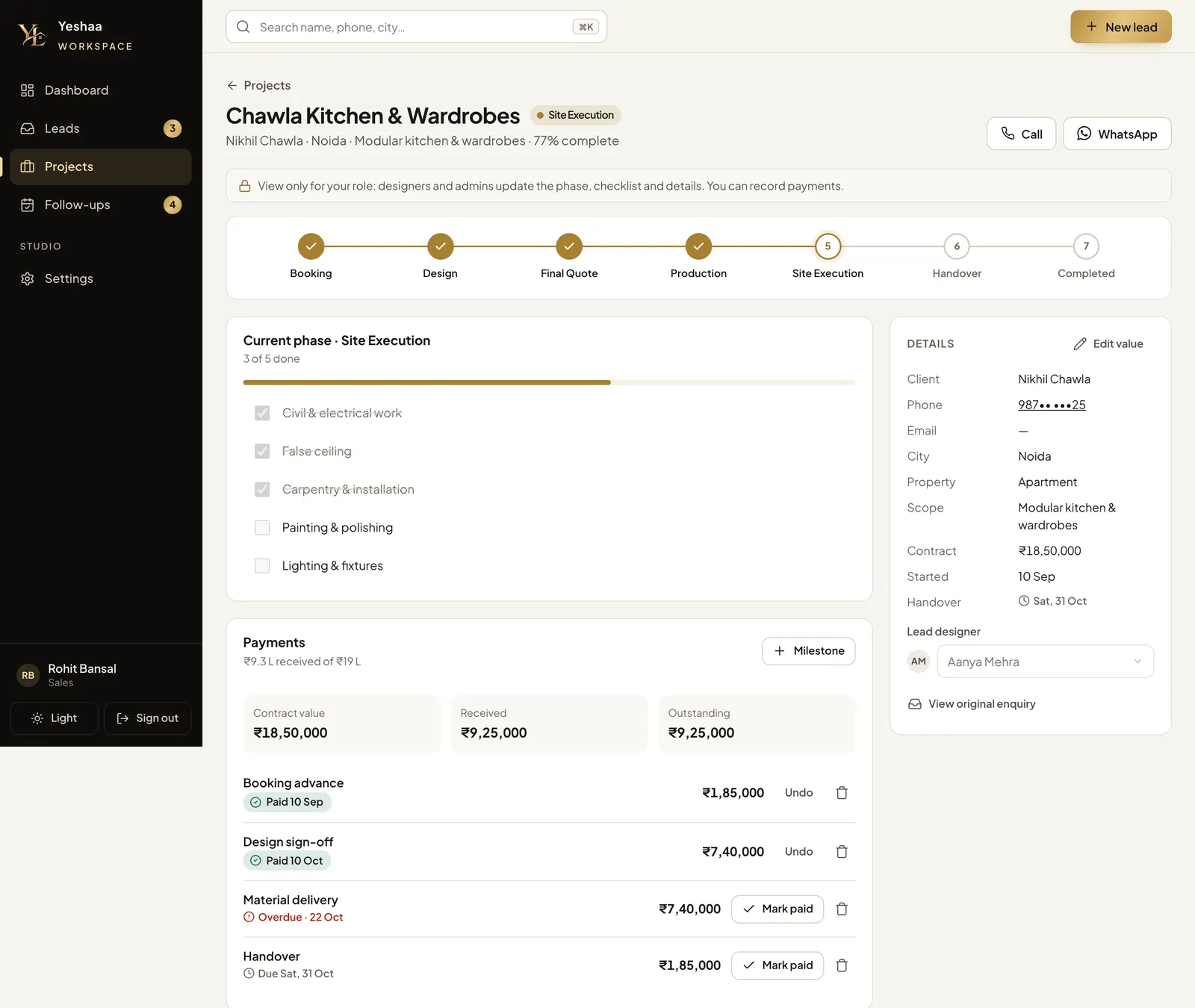
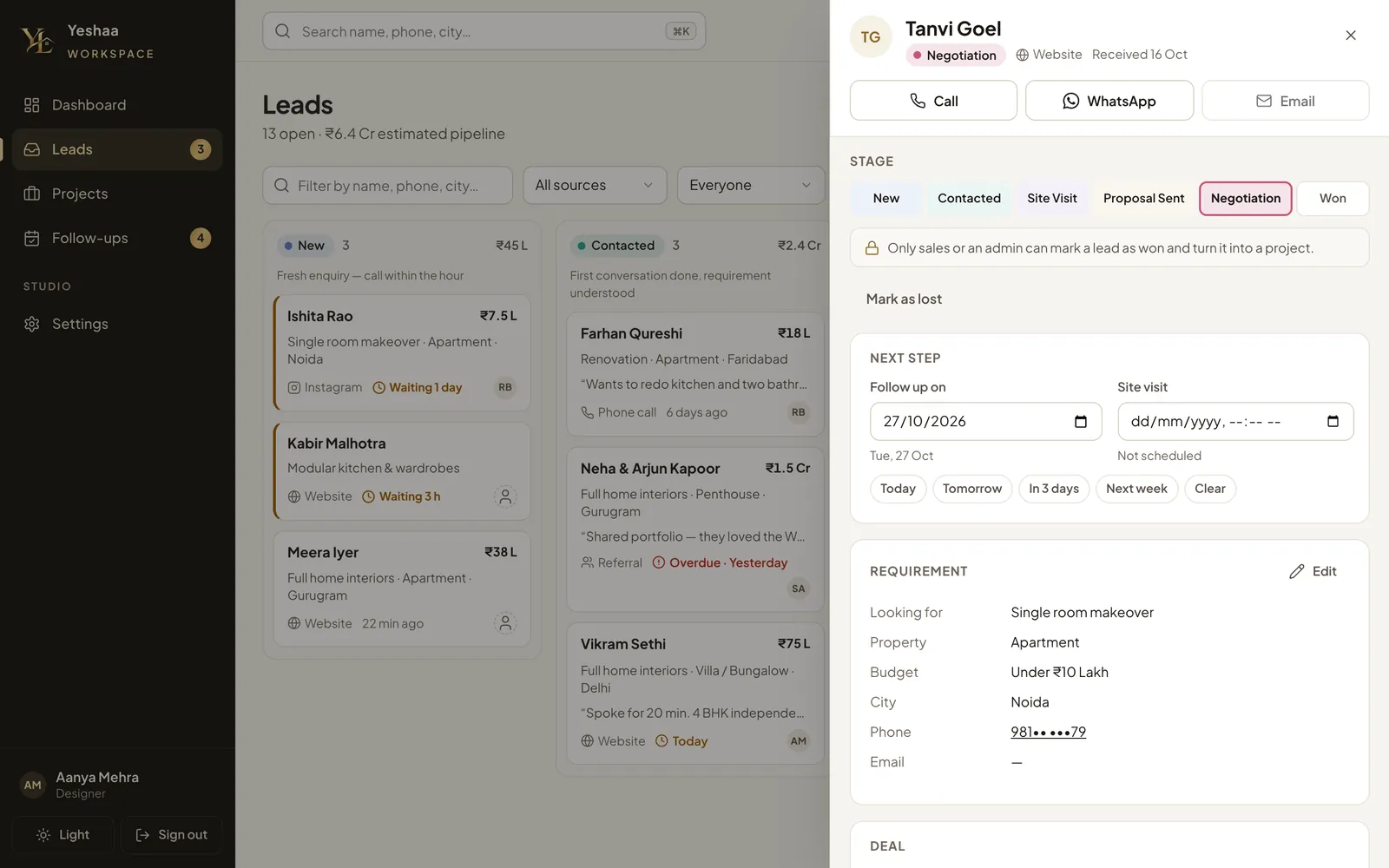
The unglamorous parts, done properly
| Area | How it works | Why |
|---|---|---|
| Passwords | PBKDF2-SHA256 at 100,000 iterations with a random salt, compared in constant time. At least 8 characters. | 100,000 is the most Cloudflare Workers allows. The first, Node-based version used scrypt. |
| Sessions | A random 32-byte token in an HttpOnly, SameSite=Lax cookie lasting 30 days. Only its SHA-256 hash is stored, and the database deletes expired sessions itself. | A leaked database doesn't give anyone a working session. |
| Change your own password | Asks for the current password. Keeps this browser signed in and signs out every other device. Won't accept the same password again. | Someone who walks up to an unlocked laptop can't take over the account. |
| Admin reset | Sets a temporary password and signs that person out everywhere | A forgotten password is a two-minute fix, with no email system to run. |
| First run | “Create your workspace” makes the first admin, protected by a one-time setup code, then closes for good | Without the code, whoever first opened the URL could make themselves admin. |
| Abuse | Sign-in limited to 8 tries a minute per IP, password changes to 5 a minute; requests from other sites refused; a strict content security policy; no third-party scripts; hidden from search engines | A private business tool shouldn't load anyone else's code or be findable on Google. |
I tested all of it before launch: 44 of 44 API checks across the three roles and both password flows, then clicked through the interface as each role, at phone width.
Including one thing I built and then removed
Moving the workspace onto Cloudflare
Version one was a dependency-free Node server with SQLite, and the first plan was to run it on a small server behind a Cloudflare tunnel. When the decision came to put the data in MongoDB and host everything on Cloudflare, there were two options: keep a Node host and only swap the database (smaller change), or rewrite the API to run on Cloudflare Workers (bigger change, one platform). I chose Workers, and the rewrite had knock-on effects:
- One Durable Object holds a warm MongoDB connection. Cloudflare recommends this pattern, and its documentation puts it at about 35 ms per query, against about 300 ms for a fresh connection.
- PBKDF2 replaced scrypt to work within Workers' crypto API, and lead and project ids stayed short numbers, so no link or screen had to change.
- Backup and restore scripts, because the free Atlas tier has no backups. They were tested end to end: 86 documents in 7 collections out and back in.
Workers have no fixed outbound IP addresses, so the database can't rely on an IP allow-list, which is a real loss of one security layer, and I said so when it was questioned. The protection has to come from credentials instead: a separate database user that can only read and write this one database, a long random password stored only as a Cloudflare secret, TLS, and alerts. The alternative is a server with a static IP, which means giving up having everything on one platform.
Alerts: built in the morning, cut by evening
New-lead alerts by email, WhatsApp Cloud API, Slack, a signed webhook and desktop pop-ups. Each had a test button, retries and a delivery log.
Every channel, setting and toast was removed. The studio is one person for now, so alerts were solving a coordination problem it doesn't have yet. The dashboard's 30-second refresh stayed. It was the clearest scope cut of the project, and the right one.
A deploy rule learned the hard way
The website and the workspace live in one repository and deploy as two separate Workers on every push. Once, a build pointed at the wrong root folder, which replaced the workspace with the whole repository and wiped its secrets and custom domain. It was fixed the same evening, and the rule (website root /, workspace root /workspace, never a third Worker on this repository) is now in the README, with a check for after each deploy.
Gaps I'd close, and what I'd measure
Deliberately not built yet
- An audit log. Stage moves, conversions, checklist ticks and payments are on each record's timeline, but role changes, password resets and deletions aren't logged. That is the first thing to add once there is a second admin.
- Invites and self-serve password reset by email, and two-factor sign-in. For now, admins share a temporary password.
- Visibility by owner. Today Sales can see project money and designers can see the whole pipeline. That is fine at this size, and worth revisiting as the team grows.
- Real social proof. The reviews and headline stats on the site are placeholders until the studio supplies its own.
Metrics
| Question | Metric |
|---|---|
| Are we fast enough? | Time from an enquiry arriving to first contact. The board already flags anything past an hour. |
| Which channel brings real clients? | Won rate and value by source: website form, callback, Instagram, referral, WhatsApp |
| Where do we lose? | Loss reasons by stage: budget mismatch, chose another designer, postponed, and so on |
| Does the portfolio sell? | Share of enquiries started from “Enquire about a similar design”, broken down by project |
| Is delivery on time? | Days in each phase against the target handover; milestones overdue |