One week, four products, one customer record
Sunspace sells rooftop solar in Agra. Before this project it had no website, no record of who had enquired, and its project paperwork lived across phones and WhatsApp chats. I built a website that answers the buyer's real question (“what will this cost me after subsidy?”), one form that records where every enquiry came from, a WhatsApp referral programme, and a staff workspace that follows each customer from first contact through subsidy, net metering and after-sales service.
The amount of software isn't what I want to show here. What matters is that nearly every element traces back to something specific about how this business works: subsidies are paid into the customer's bank account, not the installer's; net metering is filed with one of two electricity companies depending on the street; buyers and referrers live on WhatsApp; and the founder isn't technical and shouldn't have to be.
A domain, a flyer and a phone number
- No website. The domain was registered the day we started and showed a parked page. The only DNS records were for email.
- Marketing was a printed flyer with a 1–10 kW price table, a toll-free number and a Gmail address. Its headline promised a “75% subsidy”, which only roughly holds for the smallest systems.
- No record of who had enquired and no way to tell which ad, post or conversation had produced a customer.
- Project paperwork everywhere. Each installation needs electricity bills, ID and bank proof, a quotation, site photos, net-metering forms and a commissioning report. All of it sat in phones and chats.
Facts about the market that shaped the product
| Fact | What it changed |
|---|---|
| Homes get two subsidies: the central PM Surya Ghar scheme (up to ₹78,000) and Uttar Pradesh's (₹15,000 per kW, up to ₹30,000). | The calculator applies both by default, and the price a buyer sees is the price after subsidy. |
| Subsidies are paid into the customer's bank account, not the installer's. | The workspace tracks the expected and credited subsidy, but never counts it as money Sunspace has received. |
| Agra has two electricity companies: Torrent Power inside the city and DVVNL in the rest of the district. | The Agra page explains which one you file net metering with, and each project records its electricity company. |
| Dust and smog cut output, and summers are hot. | The local page addresses cleaning and heat directly, and after-sales tracks cleaning visits and AMCs (annual maintenance contracts). |
| Customers, staff and past customers all use WhatsApp, not email. | The referral programme runs entirely in WhatsApp, and every lead has one-tap call and WhatsApp buttons. |
Six people, six different jobs
| Who | What they need to get done | What failed before |
|---|---|---|
| Homeowner researching solar | Know what a system would cost after subsidy, and whether this company is real | A flyer whose numbers didn't match their situation, and nowhere to check the company |
| Business or factory owner | See engineering credibility for a bigger, riskier purchase | Nothing beyond a price list for homes |
| Founder | Capture every enquiry, know which marketing produced it, and run the business without a developer | Enquiries lived in call logs and chats, and nothing could be attributed to a source |
| Sales staff | See whose lead is whose, what is due today, and the customer's context before calling | No shared list of leads |
| Installation staff | Know which paperwork step a project is on, and find each document | Documents scattered across phones |
| Referrer | Pass on a friend's number with no app and no form, and get paid | No programme existed |
Five rules I used to settle decisions
I wrote these down early so that small decisions didn't each turn into a debate. Most of the choices later on this page come from one of them.
Local beats national
Agra before India. Agra in the page titles, Agra as the default city, and the two local electricity companies named. A small installer wins on being nearby, not on being big.
Show the maths
Every estimate lists its assumptions and what it leaves out. Payback is calculated conservatively. Trust is what this purchase runs on.
One way in, and no lead silently lost
One form behind every button, no public email, and a visible error if the server can't save. A lead that never arrives is worse than an error the visitor can see.
Derive status, don't type it
A project's stage is calculated from the checklist, never set by hand, so it can't fall out of date.
Meet people where they are
WhatsApp for referrers and prospects, in English, Hindi or Hinglish, using buttons rather than typed replies.
Element by element
The design started in Claude Design, and twelve pages shipped on day one: home, a solutions overview, four solution pages (residential, commercial, industrial, solar + battery), the savings calculator, how it works, about, contact, privacy and terms. Five more followed: the Agra page, two guides, a guides index and the referral page.
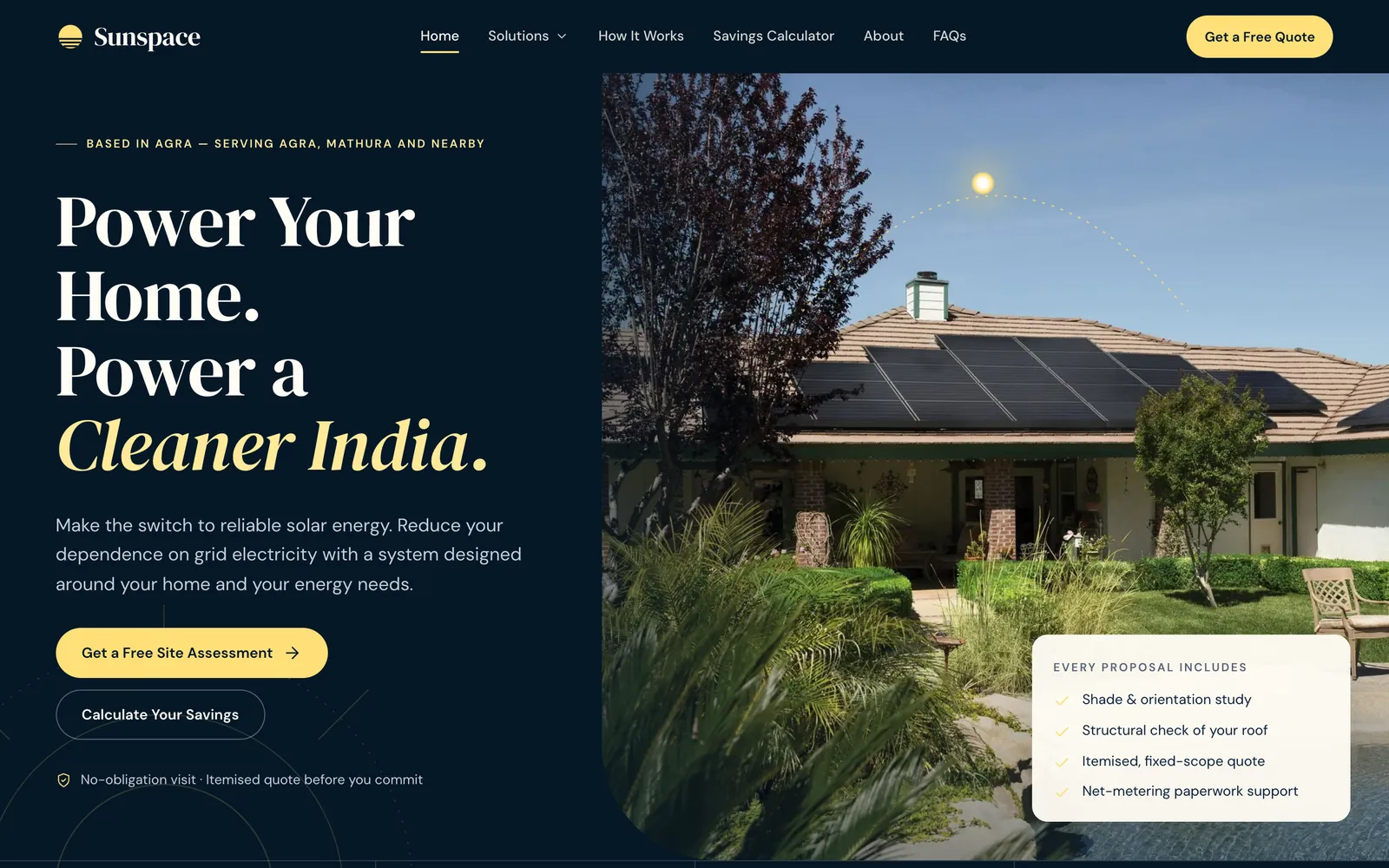
The home hero
| Element | What it says | Why |
|---|---|---|
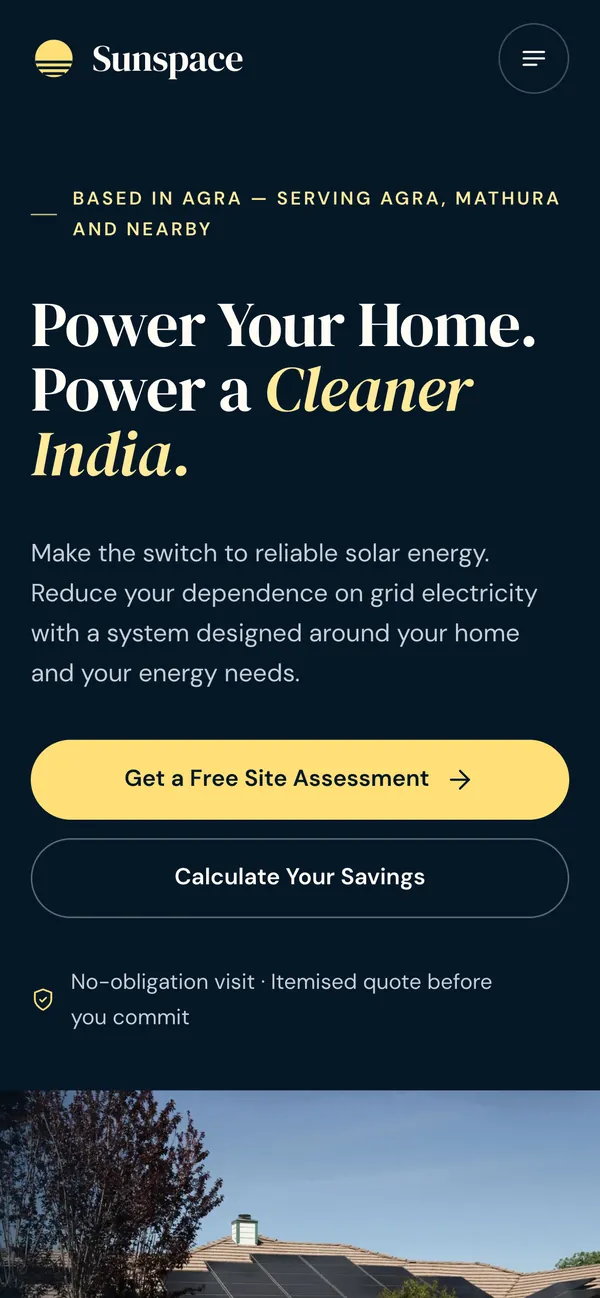
| Line above the headline | Based in Agra — serving Agra, Mathura and nearby | It started generic. On day two it became local proof: a buyer is reassured by an Agra address, and it matches what people type into search. |
| Headline | Power Your Home. Power a Cleaner India. | Kept from the design. The line above already handles “are you local?”, so the headline can carry the motivation. |
| Main button | Get a Free Site Assessment | Not “Get a quote”. An honest quote needs a site visit (shade, roof structure), so the button names what actually happens next, and it costs nothing. |
| Second button | Calculate Your Savings | For visitors not ready to hand over a phone number. It is a self-serve route that ends at the same form, with their estimate already attached. |
| Line under the buttons | No-obligation visit · Itemised quote before you commit | Removes the two fears that stop people enquiring: a pushy salesperson and hidden costs. |
| Floating card | Every proposal includes: shade and orientation study, structural check, itemised fixed-scope quote, net-metering paperwork support | These are the things a cheap installer skips. The card answers “why not just go with the cheapest?” before the visitor thinks to ask it. |
One form behind every button
Every call to action opens the same form, so there is one set of rules and one place a lead can go wrong. The field rules and error messages from the design were copied over word for word.
| Field | Rule | Why |
|---|---|---|
| Full name | Letters, including Indian scripts | People write their name in Hindi too, and a form shouldn't reject them for it. |
| Mobile | 10 digits starting with 6–9, stored as +91 | That is the Indian mobile format. Storing one consistent form lets the workspace spot duplicates and open a WhatsApp chat in one tap. |
| City or PIN | “Agra or 282002”. Pre-filled on the Agra page. | Tells sales whether the address is in the service area and which electricity company the customer is with. |
| Property type | House, apartment, commercial, industrial, institution | Decides whether the home subsidy applies and who handles the lead. Apartments also need their housing society's approval. |
| Monthly bill | ₹200 or more, hint: “helps us size the system” | People know their bill in rupees, not their units. It is the single best input for sizing. |
| Anything we should know? | Optional, up to 1,000 characters. Prompt: “Roof type, outages, preferred call time…” | Gives the salesperson what they need for the first call. When a redesign dropped it from the lead list, it came back as a Remarks column. |
| Consent | Checkbox. Stores which version of the privacy notice was accepted. | India's DPDP Act (the 2023 data-protection law): proof of exactly what the person agreed to. |
| Hidden honeypot | An invisible field that only bots fill in | Stops spam without adding a CAPTCHA. |
Captured without the visitor typing anything: which button they pressed (home_hero, calculator, agra_page, refer_page…), any estimate they ran, the ad tags from their first visit (UTM, gclid, fbclid), the page they landed on and the site that referred them. Each enquiry can be traced back to whatever produced it.
On the server: each lead gets a reference that is easy to read out over the phone (SS-YYMMDD-XXXXXX), and submissions are limited to 8 per 10 minutes per IP. Each lead is sent to every configured destination at once, and one success is enough. If no destination is configured in production, the API returns an error and the visitor sees the form's error message, never a false “thank you”.
Sunspace publishes no email address, which was a deliberate choice: every enquiry goes through the form or the phone, so it is captured and attributed. But the form still requires the visitor's email, and the team follows up by phone and WhatsApp. That is one field too many for this audience, and the first thing I'd A/B test.
A transparent estimate, not a sales trick
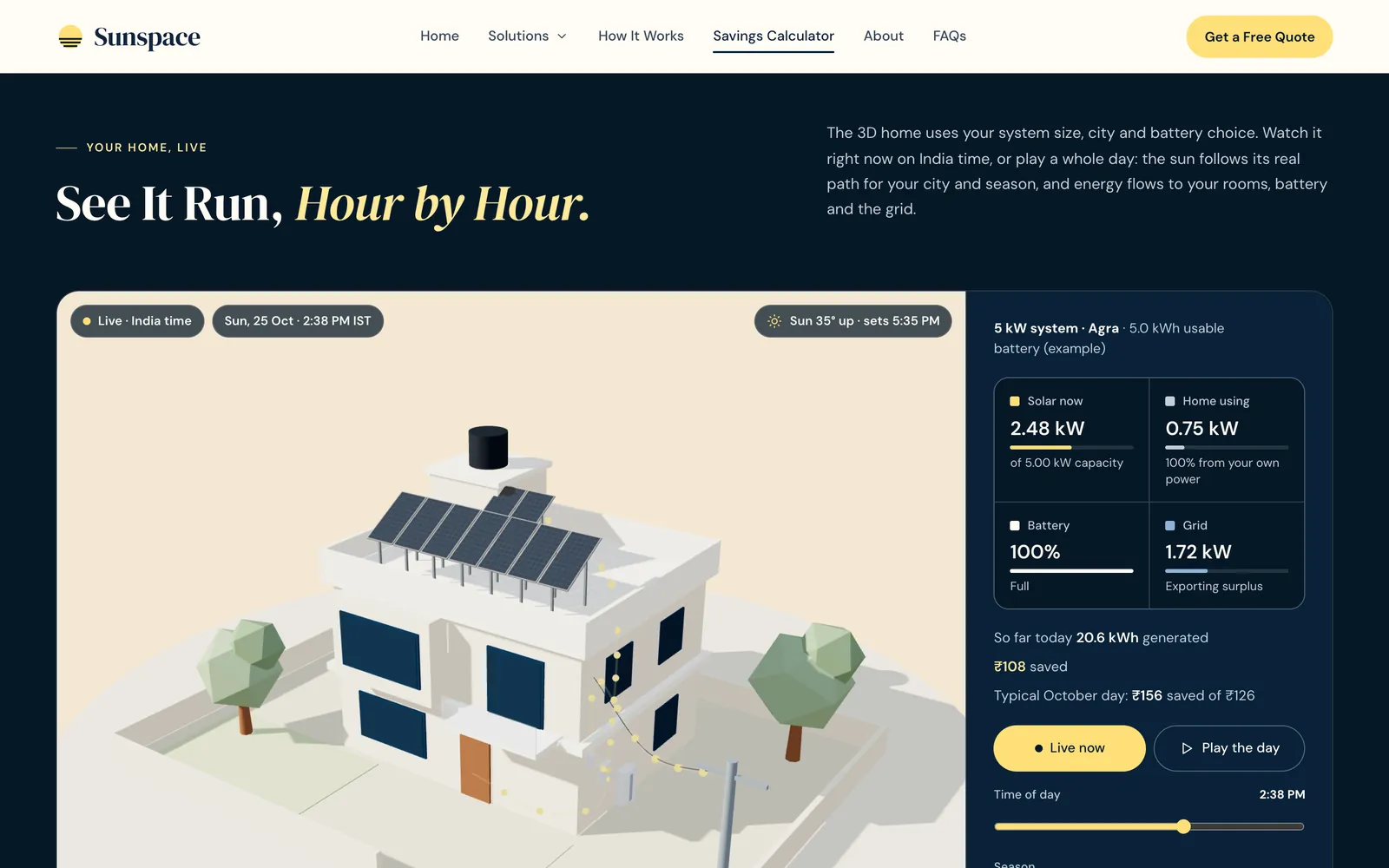
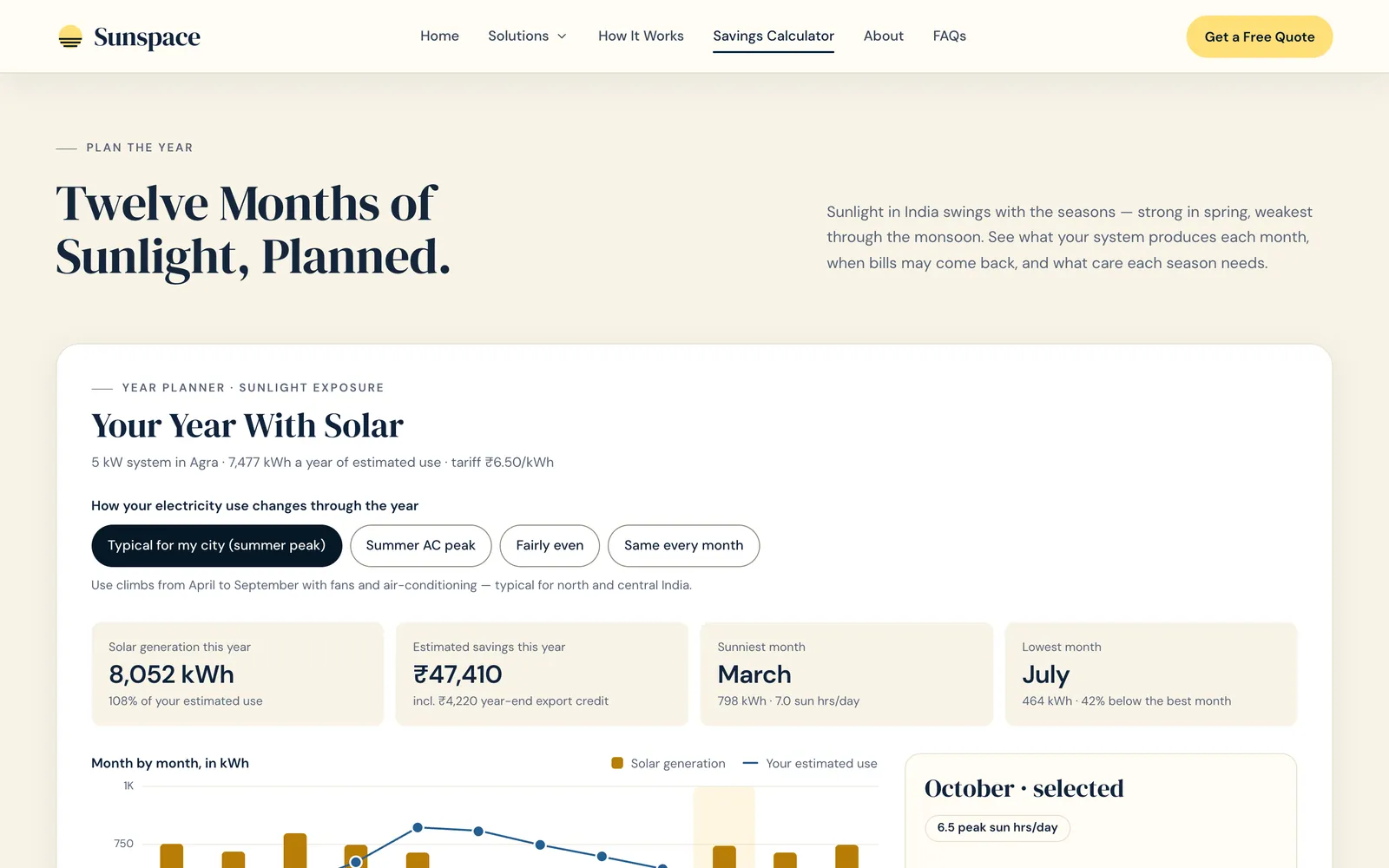
The question a buyer actually has is “what will this cost me, after subsidy, and when does it pay back?”. The calculator answers it in under a minute and then hands that answer to the sales team.
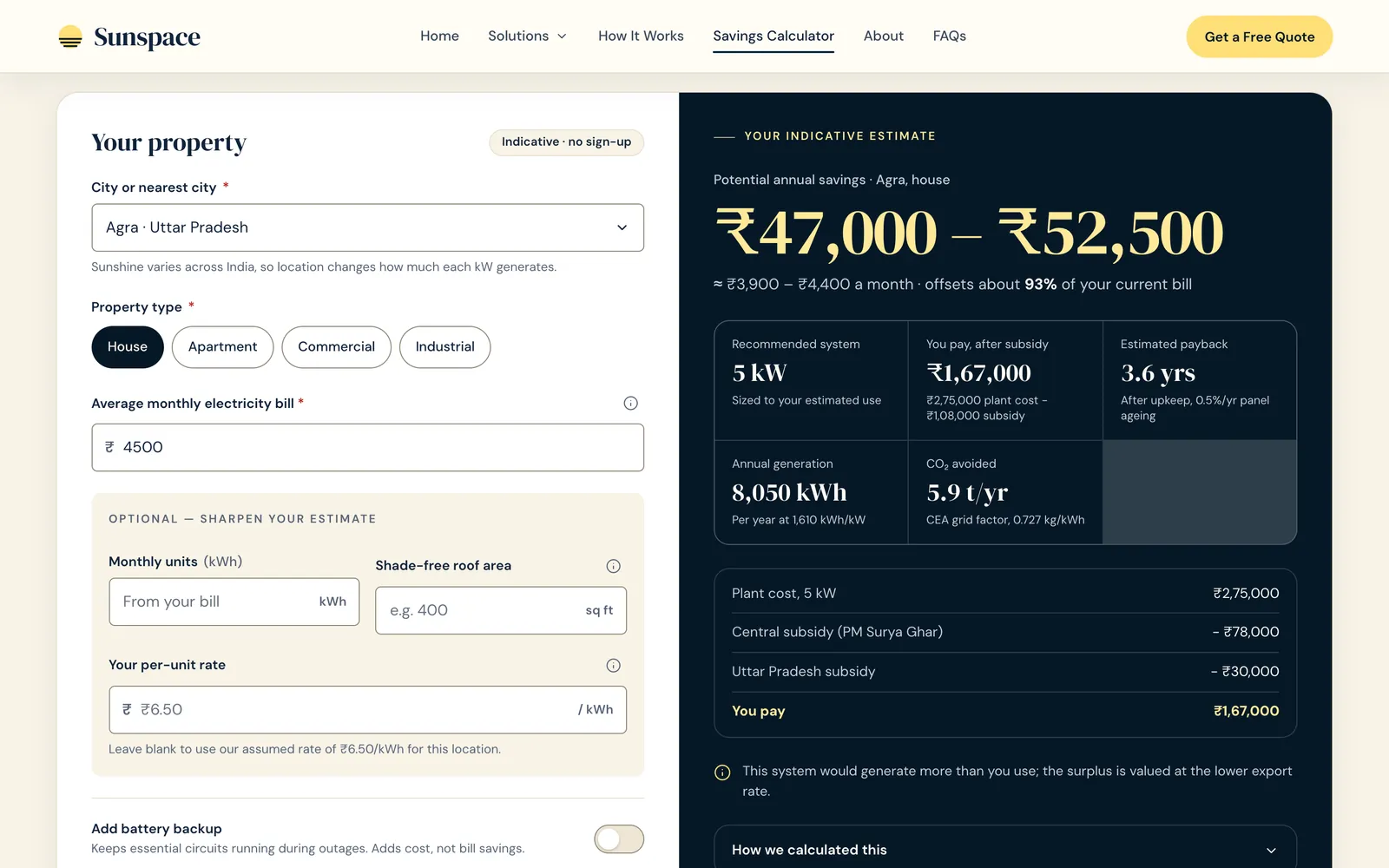
Inputs, and why each is there
| Input | Why |
|---|---|
| City (19, with Agra and Mathura first) | Sunshine varies across India, so each kW generates a different amount. City yields come from PVGIS and NASA POWER. Agra is 1,610 kWh per kW per year. |
| Property type | The home subsidy applies only to houses. Apartments are flagged: “needs society approval”. |
| Monthly bill | The one number everyone knows. A tooltip explains why it is asked for. |
| Optional: units, shade-free roof area, per-unit rate | For people who have their bill to hand. Roof area caps the system size at about 100 sq ft per kW, so the estimate never suggests a system that won't fit. |
| Battery backup | Labelled “Adds cost, not bill savings”. A battery is sold as backup power, not as savings. |
| Apply home subsidy | On by default for houses, because that is the price a homeowner will actually pay. |
Modelling choices
- A range, not a number. Savings are shown ±10%, because a single precise figure would claim more certainty than a pre-visit estimate has.
- Conservative payback. It includes 0.5% panel ageing a year and assumes electricity prices won't rise. Promising less keeps the site survey from having to walk the number back.
- The method is on the page. A “How the estimate works” section lists the formulas and what is not included: financing, inverter replacement, shading on the actual site.
- No retyping. “Carries into your request so you never type it twice”: the estimate is attached to the lead, so sales starts the call already knowing the system size.
Before and after: pricing from the company's own price list
| Day one | Day two | |
|---|---|---|
| Price basis | A generic per-kW industry range | The company's own 1–10 kW price table, interpolated in a straight line between rows |
| Subsidy | Central only, off by default | Central plus Uttar Pradesh, on by default for houses |
| Default location | Figures from other cities | Agra |
| Sizing | Fractional kW | Whole kW, which is how systems are sold |
One pricing file now feeds the calculator, the Agra page and both guides, so the site can't quote two different prices. I checked the calculator against all ten rows of the flyer. That caught a missing digit in the flyer's 7 kW row. I also chose not to repeat the flyer's “75% subsidy” headline anywhere, because it is only roughly true at 1–2 kW.
Local search, and an honest split of the work
I wrote a 90-day SEO plan that starts with Agra, then built the parts of it a developer can build. The Agra page answers the questions a local buyer actually searches for:
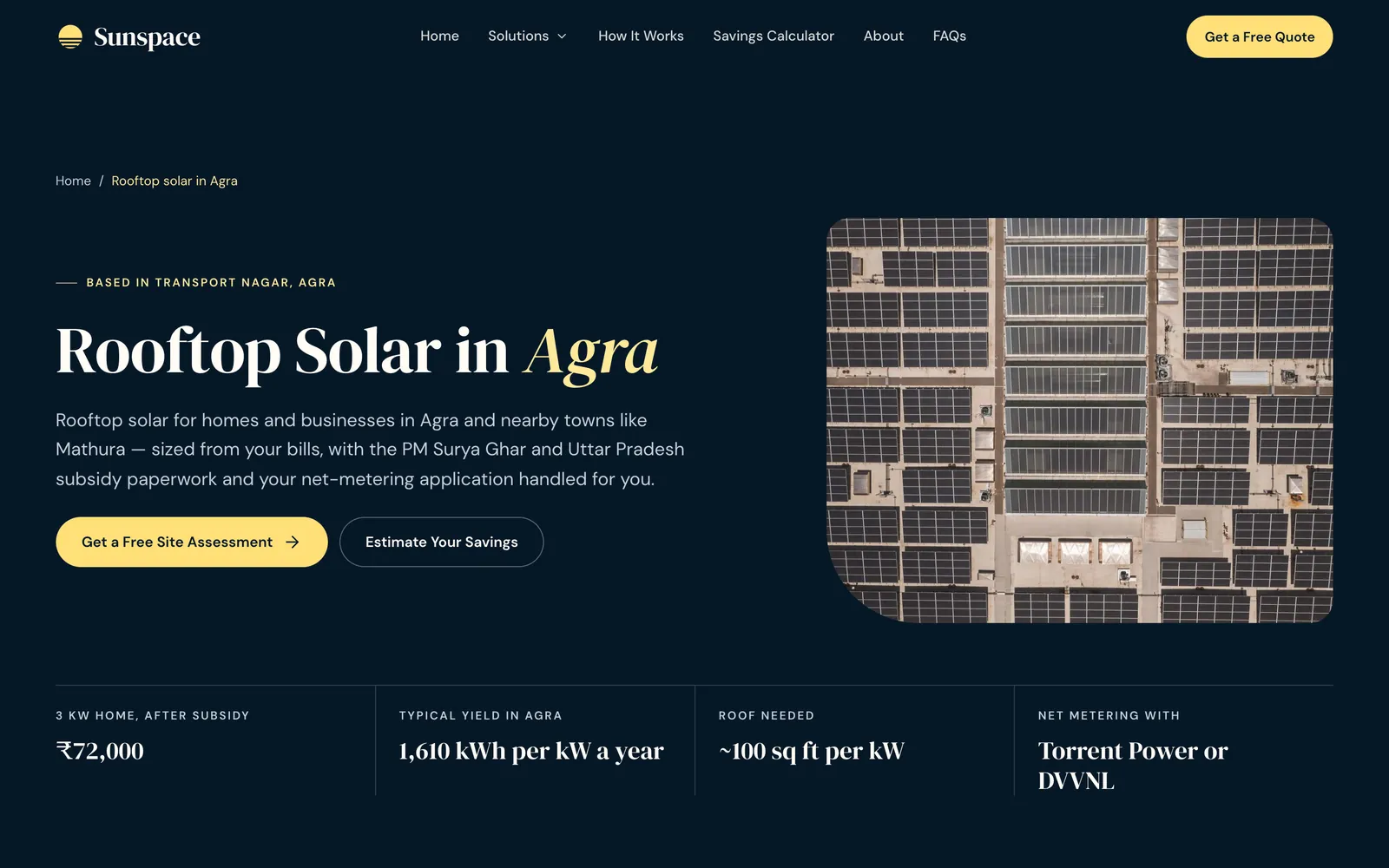
- Price table and a worked 3 kW example showing the price after subsidy, step by step.
- “Who supplies your power”: Torrent Power or DVVNL, which decides who you file net metering with.
- Local conditions: Agra's sunlight, dust and smog (more cleaning) and summer heat.
- Six FAQs marked up as FAQ structured data, plus the areas served and a form pre-filled with Agra.
- Two guides (“PM Surya Ghar subsidy in Agra” and “Rooftop solar cost in Agra”), LocalBusiness structured data, and a www → apex redirect that keeps the path and ad tags.
- A Google Business Profile description at 689 of 750 characters, with no prices because Google doesn't allow them in that field.
The plan says plainly that most ranking work is the founder's: the Google Business Profile, reviews, local listings and registering as a PM Surya Ghar vendor. The developer's part is turning that work into pages. Writing it down kept me from implying a website alone would bring in rankings.
Scope that grew one real need at a time
I didn't plan a staff app. I planned the smallest thing that would stop leads getting lost, and let real constraints pull the scope up from there. Each step below was triggered by a specific problem, not by a roadmap.
- Day 1
Don't build an admin screen. Send leads to tools the founder already uses: a Google Sheet plus an email alert.
- Day 1
The sheet fails. The business Gmail account couldn't create the Apps Script the sheet needed. Leads go into MongoDB instead, with a password-protected page at
/admin/leads. - Day 1
Moved to its own app. Twelve minutes later the leads page moved out of the website to
workspace.sunspace.in. The public site keeps only the code that writes a lead, and the internal tool can grow without putting the public site at risk. - Day 2
Individual accounts, so employees could use it, each with their own sign-in and an activity log of who changed what.
- Day 3
A full lifecycle. A lead pipeline with hot/warm/cold interest and priority, then projects from a won lead through to after-sales, documents, the WhatsApp inbox and referrals.
- Day 7
Access by area (leads, projects or both), leads added by hand for walk-ins, and the save and filter speed fixes.
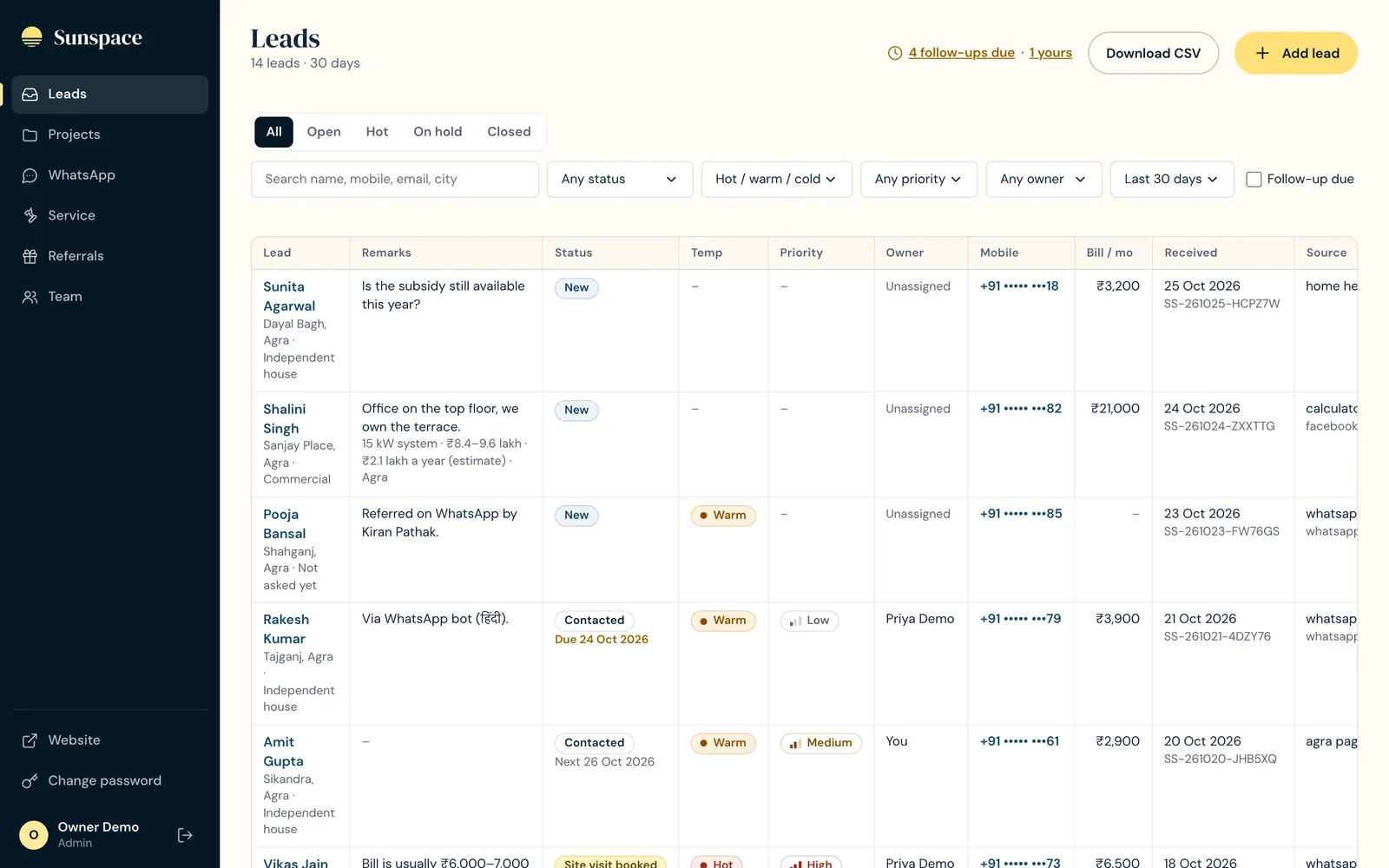
The lead pipeline
| Field | Values | Why it is separate |
|---|---|---|
| Status | New → Contacted → Site visit booked → Proposal sent → Negotiating → Won | Where the deal is. Every change is logged with who made it. |
| Side exits | On hold, Lost, Cancelled, Not a fit, each with an optional reason | They mean different things. Not a fit points at ad targeting, Lost at pricing or the sales pitch, On hold is a follow-up for later. Lumping them together would hide the lesson. |
| Interest | Hot / Warm / Cold | How keen the customer is, which is not the same as where the deal is. |
| Priority | High / Medium / Low | How much the team should care. A lukewarm 50 kW factory still matters more than a keen 1 kW home. |
| Follow-up and owner | A date. Anyone can take an unassigned lead; only admins reassign. | Closed leads never count as “follow-up due”, so the due list stays honest. |
| Source | A website button, WhatsApp, a referral, walk-in, word of mouth, phone call, event or camp | Walk-ins and word-of-mouth leads were invisible until they could be added by hand. Adding one warns if the number already has an open lead, with an “add anyway” option. |
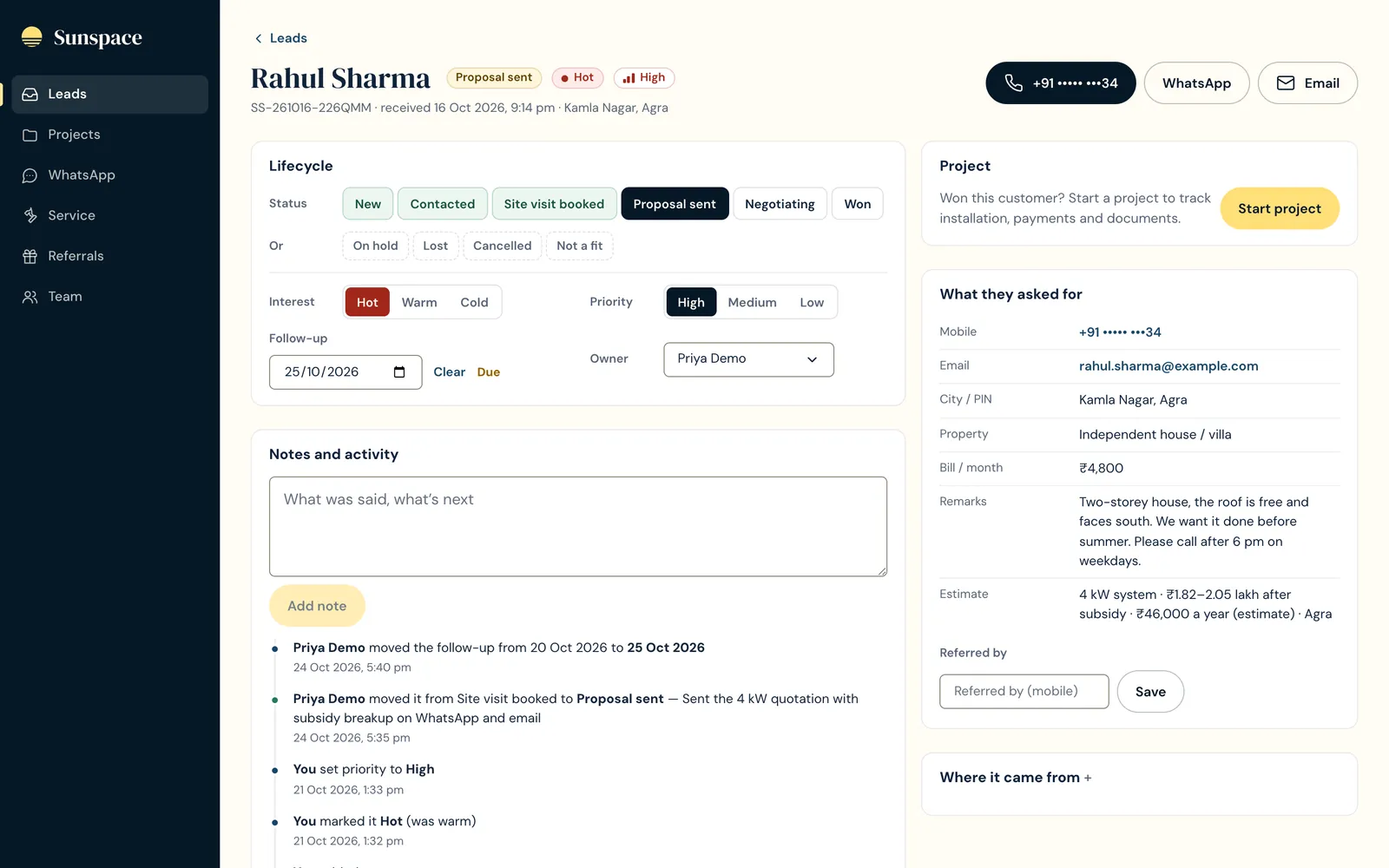
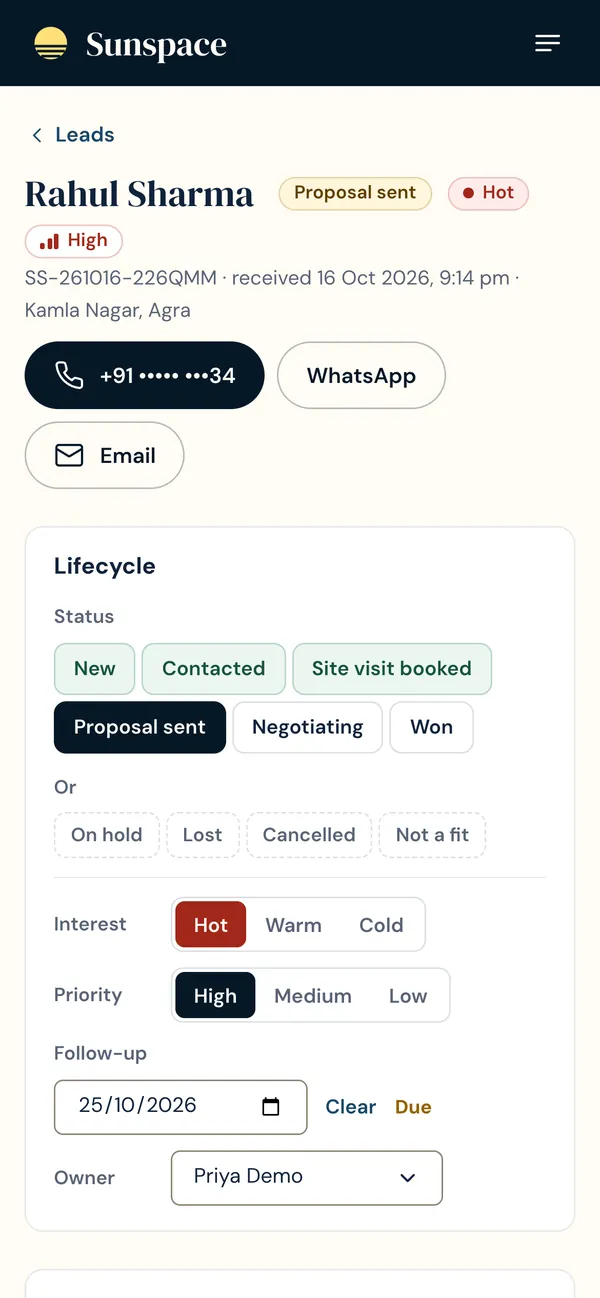
“Call and WhatsApp open my personal number.”
Nothing was hard-coded. The leads in question held my own number from testing. The buttons already open the customer's chat in whichever WhatsApp is signed in on that device. No change shipped, and I avoided building a fix for a bug that didn't exist.
A lifecycle derived from a checklist
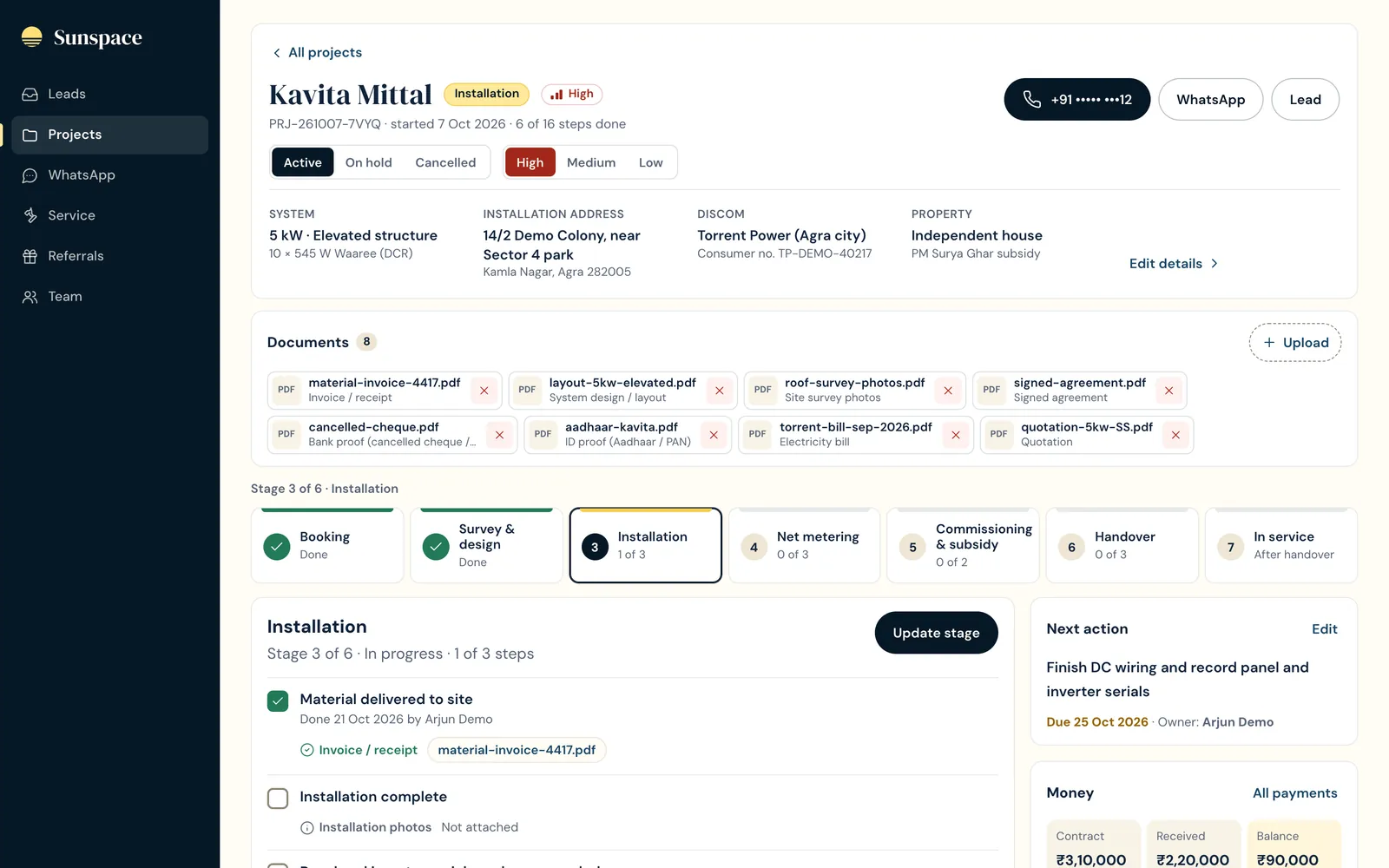
The biggest product decision in the workspace: a project's stage is never set by hand. It is the first stage that still has a required step open.
A status someone types goes out of date the moment they forget to update it. A checklist is what the installation team actually works through, so the stage is calculated from it. Optional steps (such as “System design finalised”) can be skipped without blocking the stage. When the lifecycle definition changes, a version stamp makes every existing project recalculate its stage once.
The stages, after checking them against how installations actually run
| Stage | First draft | After review |
|---|---|---|
| Booking | Steps in a theoretical order | The real order: documents → quote → agreement → advance |
| Survey & design | “System design finalised” required | Optional, since small jobs skip it |
| Portal & DISCOM approval | Its own stage | Removed: not a separate step in practice |
| Net metering | Application → inspection → meter | Application → net meter installed → inspection by the electricity company |
| Commissioning & subsidy | Included uploading to the subsidy portal and claiming the subsidy | Plant commissioned + final payment received |
| Handover | Included a monitoring-app walkthrough | Dropped. The Google review and NPS (satisfaction score) became their own steps. |
The result is Booking → Survey & design → Installation → Net metering → Commissioning & subsidy → Handover → In service, with 16 required steps.
Money, documents and after-sales
- Payments and subsidy. Contract, received and balance. The expected central and state subsidy is filled in from the system size, and the dates each is credited are recorded. Subsidy is never counted as received, because it goes to the customer's bank, and counting it would make every balance look smaller than it is.
- Documents. 18 document types (bills, Aadhaar and PAN ID cards, bank proof, quotation, site photos, DCR certificate, net-metering papers, commissioning report, warranty cards), each attached to the checklist step that needs it. Files are stored privately in Cloudflare R2 and can only be opened through the signed-in app. Up to 10 files at 15 MB each; HTML files are refused. “Replace the current file” is on by default (except for photos), and the old file is deleted only after the new one uploads.
- After-sales. Warranty end dates counted from commissioning, AMC dates, and service tickets (complaint, cleaning, maintenance, warranty claim). A Service page lists open tickets, visits due in the next 14 days and AMCs ending soon. In a dusty city, cleaning visits keep the relationship going, and that is where referrals come from.
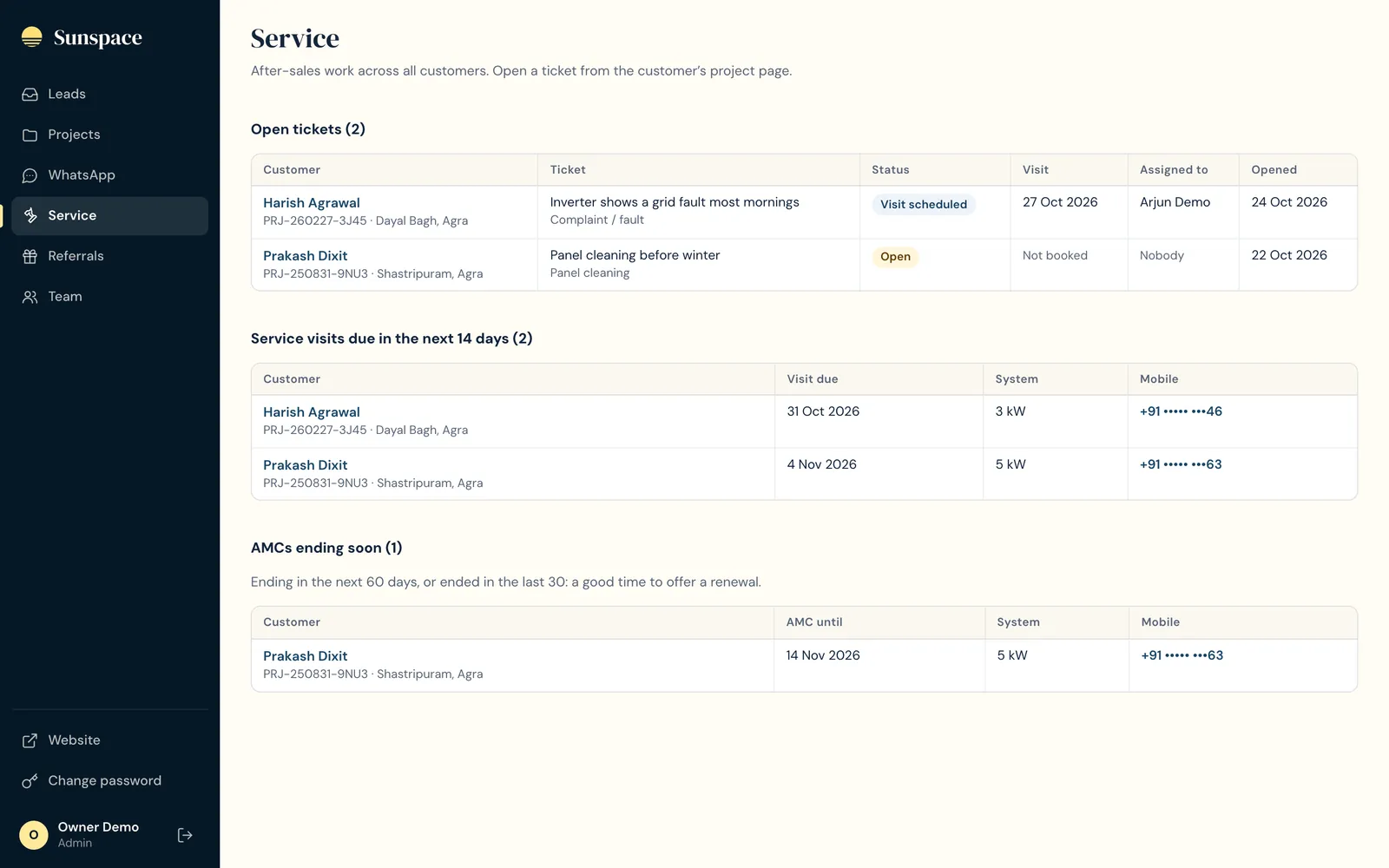
The project page went through three versions
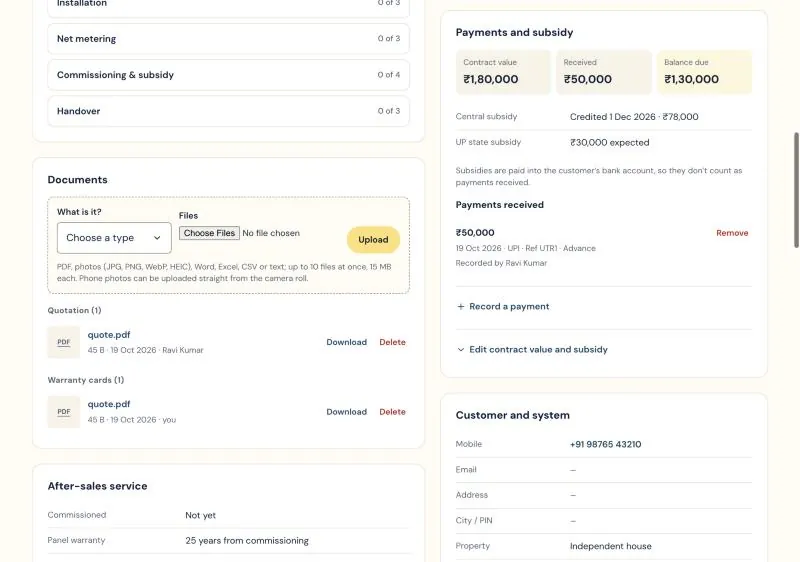
One long page, with documents in the middle of the checklist. Every tick reloaded the whole page.
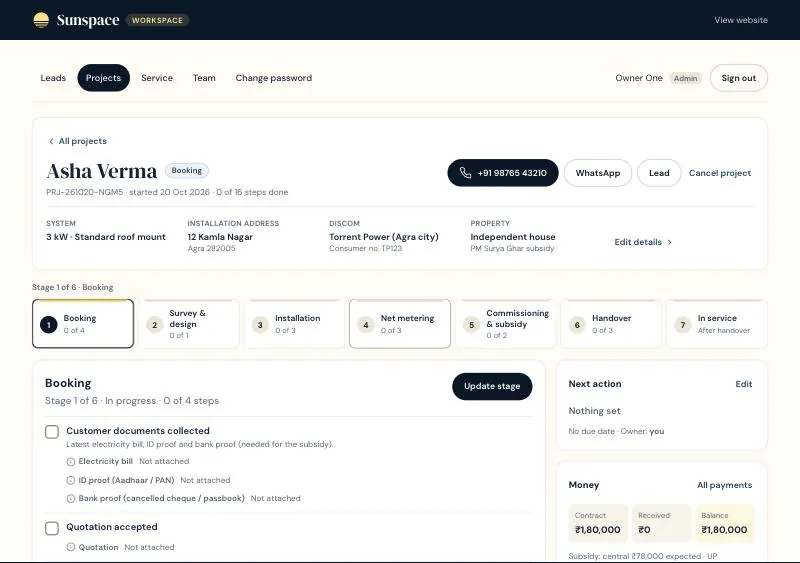
A stepper, and “Update stage”: tick several steps, attach each step's documents, add a note, and save once. Only that part of the page refreshes. Version three moved navigation into a sidebar and documents into a compact bar.
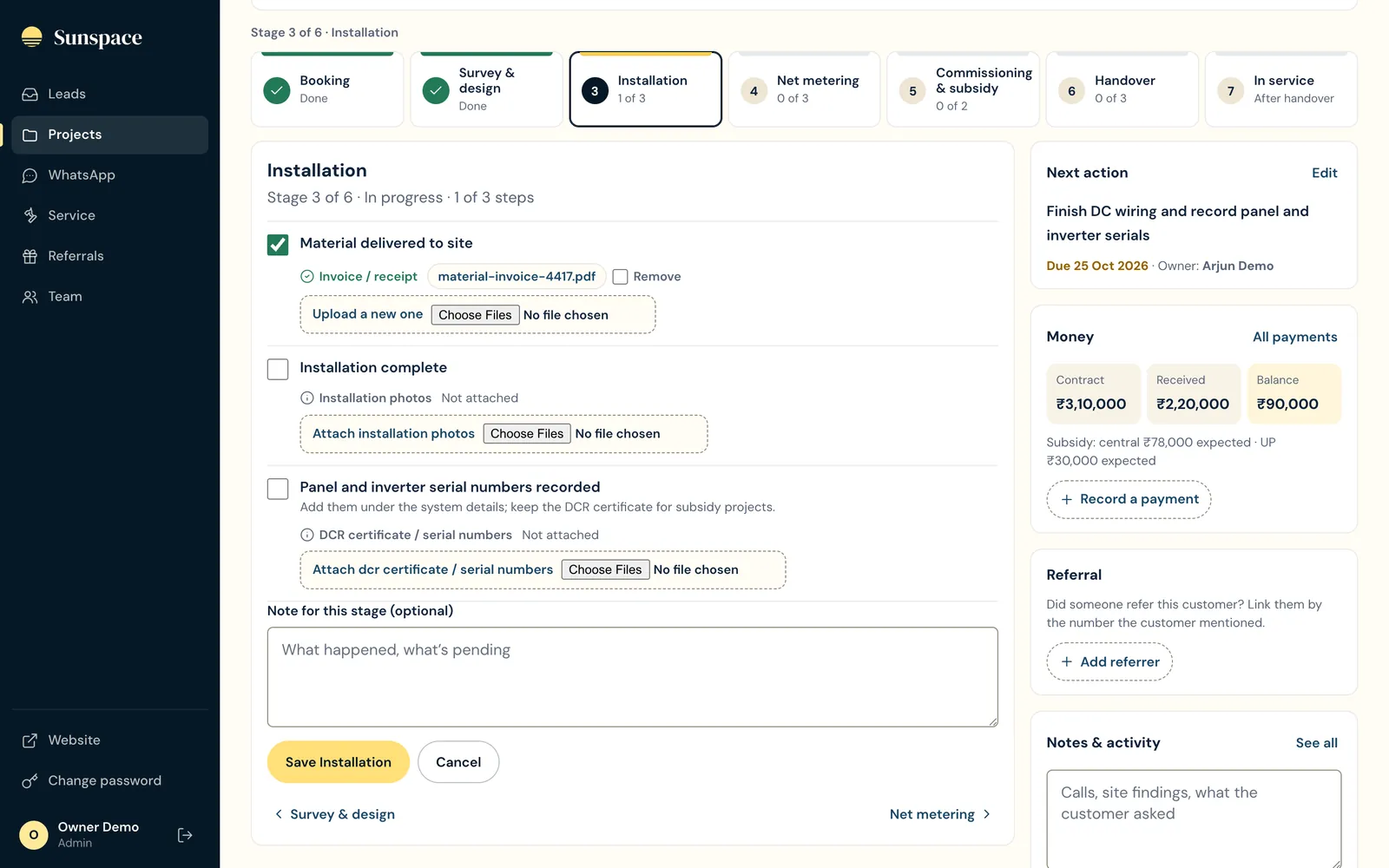
My own review of version one was blunt: every click refreshes the whole page, and the project flow doesn't look like a flow. A second round was about speed and calm:
- Feeling instant. Whole rows are clickable and load in advance on hover, and loading states appear immediately. Switching a filter cancels the request already in progress (the fix I asked for). Rapid status clicks are merged so only the latest is saved: in testing, twelve quick clicks left one clean history entry.
- Less visual noise. A sidebar replaced the top header, borders got lighter, table headers stay visible while scrolling, and the app is called “Sunspace”, not “Workspace”.
Permissions that match how the team is staffed
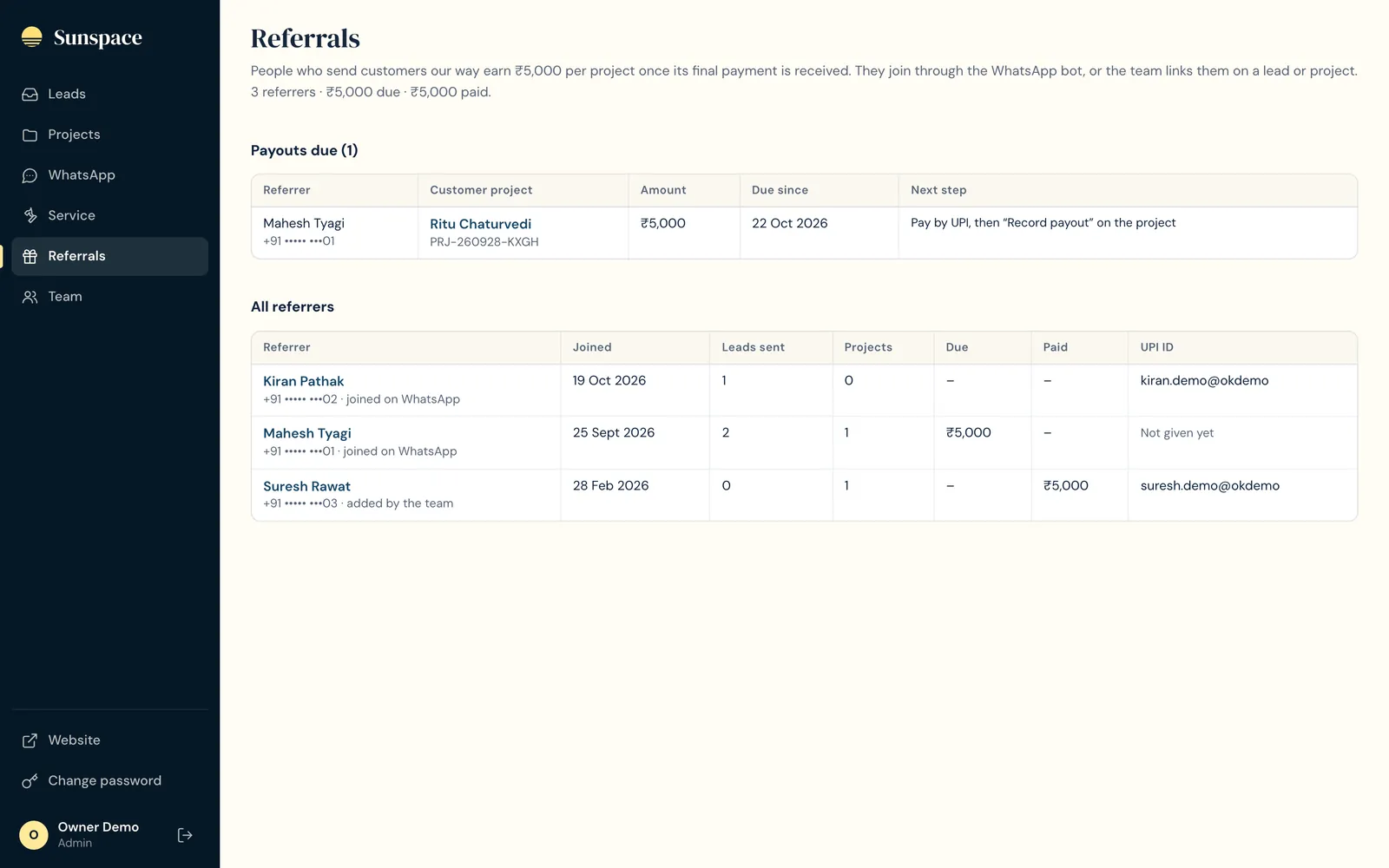
The first version had two roles: an admin and a member who could work leads. Then the real requirement arrived: whoever adds a team member decides whether they see leads, projects or both; referrals shouldn't show on the team page; and only admins should check referrers and pay them out. Some people only sell, some only install, and the referral money is the founder's.
| Capability | Admin | Leads | Projects | Both |
|---|---|---|---|---|
| Leads, WhatsApp inbox, add a lead, take an unassigned lead | ✓ yes | ✓ yes | — no | ✓ yes |
| Projects, documents, payments, service | ✓ yes | — no | ✓ yes | ✓ yes |
| Referrals and referral payouts | ✓ yes | — no | — no | — no |
| Reassign owners, export CSV, manage the team | ✓ yes | — no | — no | — no |
| Remove payments, cancel or reopen projects, delete files someone else uploaded | ✓ yes | — no | — no | — no |
Columns Leads, Projects and Both are member accounts given that area by an admin.
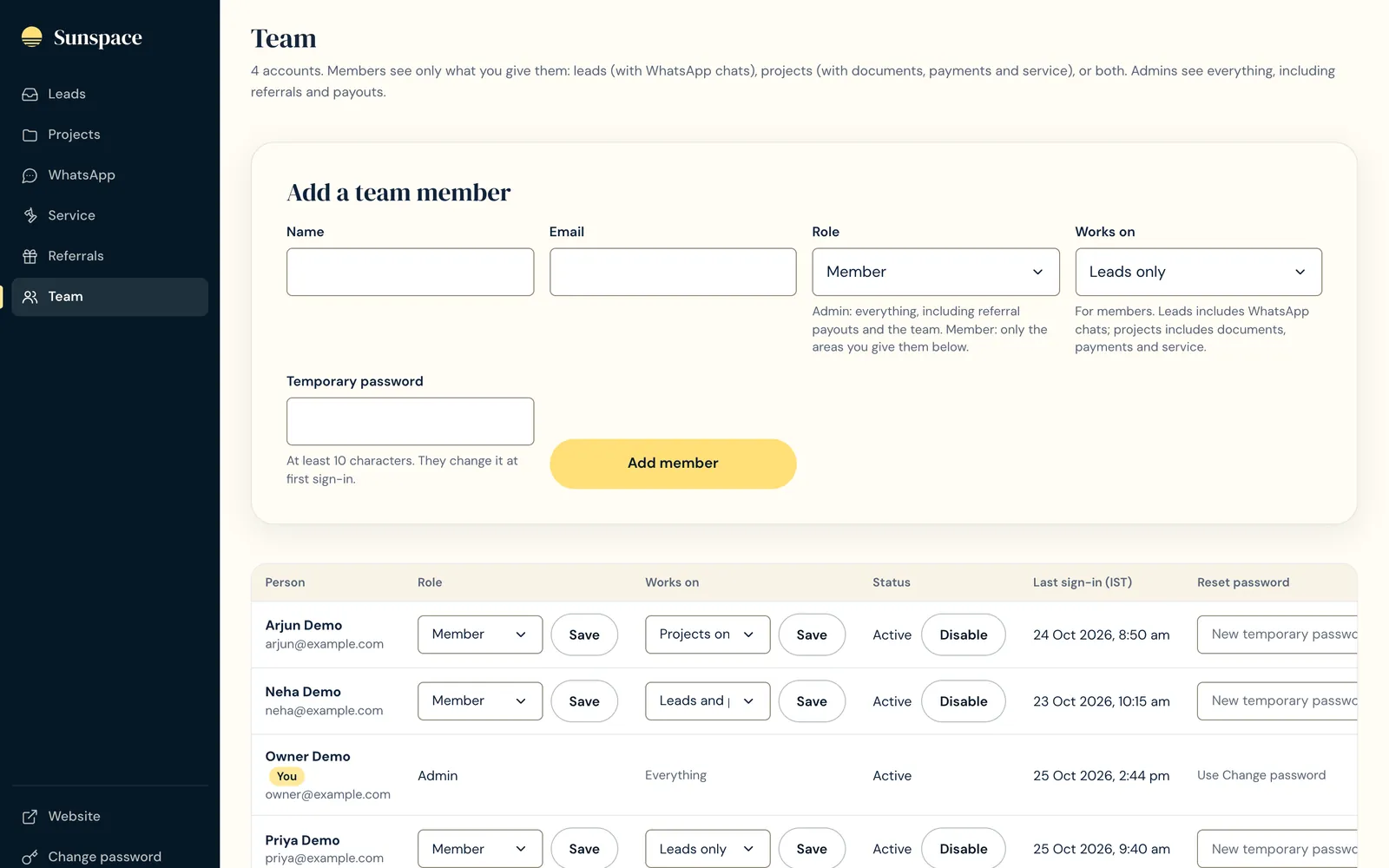
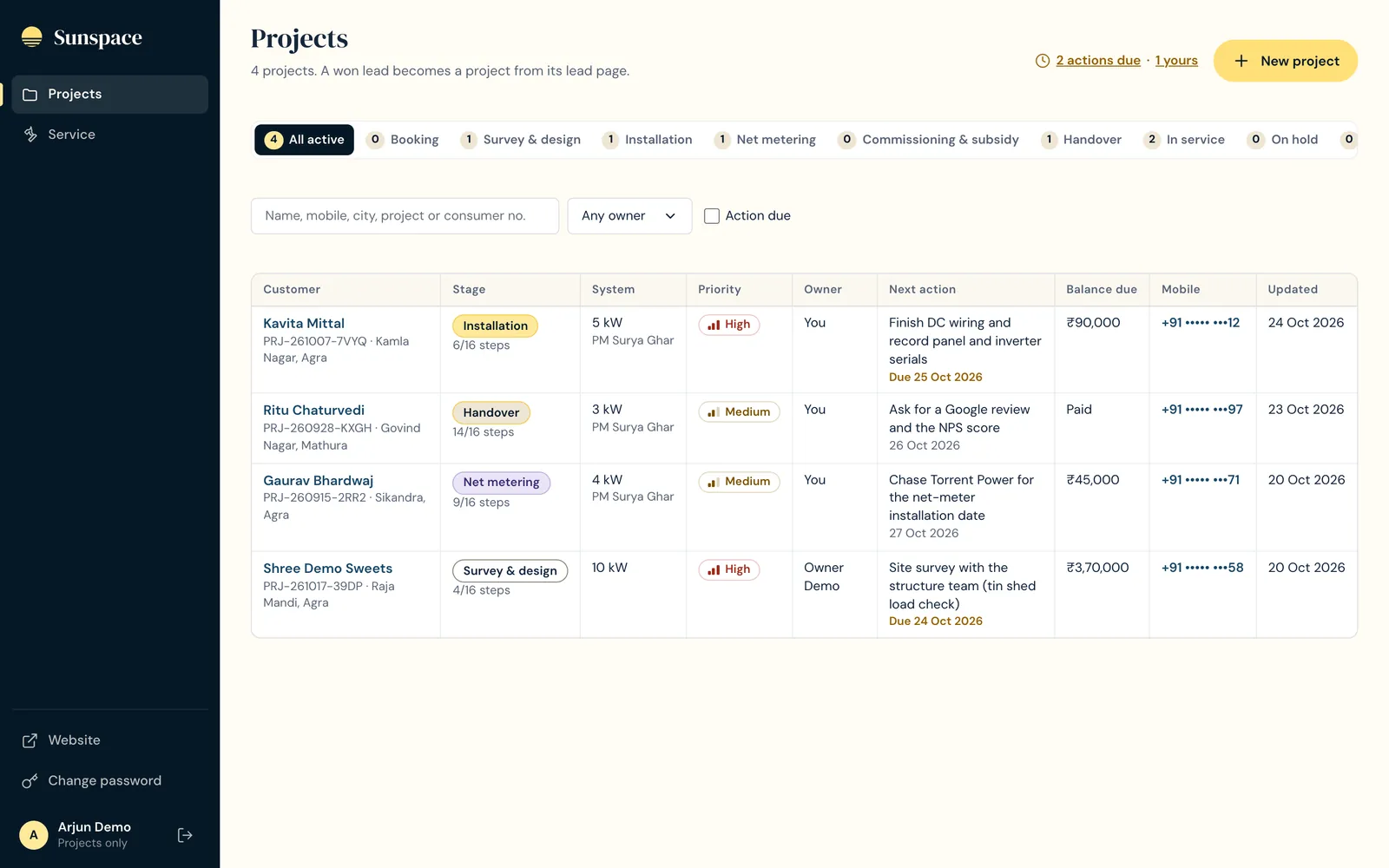
Details that make the matrix work in practice
- Hidden, not just blocked. The sidebar shows only the areas a person can use, and they land in their own area after signing in.
- Pickers respect access. Owner dropdowns list only people with access to that area, so a project can't be assigned to a leads-only salesperson.
- No one locked out by the change. Accounts created before this existed keep both areas.
- Security basics. Everyone has their own email and password. Passwords are hashed with PBKDF2-SHA256 at 100,000 iterations, the most Cloudflare Workers allows. Sessions are stored as hashed tokens and expire after 7 days, so resetting or disabling someone signs them out everywhere at once. Temporary passwords must be changed at first sign-in. Nobody can disable or demote themselves, and there is always one active admin. Sign-in attempts are rate-limited, form posts from other sites are refused, and every page is hidden from search engines.
- First run. A one-time setup key creates the owner account, then setup closes for good. Hashed passwords can't be recovered, so there is a small script to set a new one directly in the database.
A referral programme with no forms
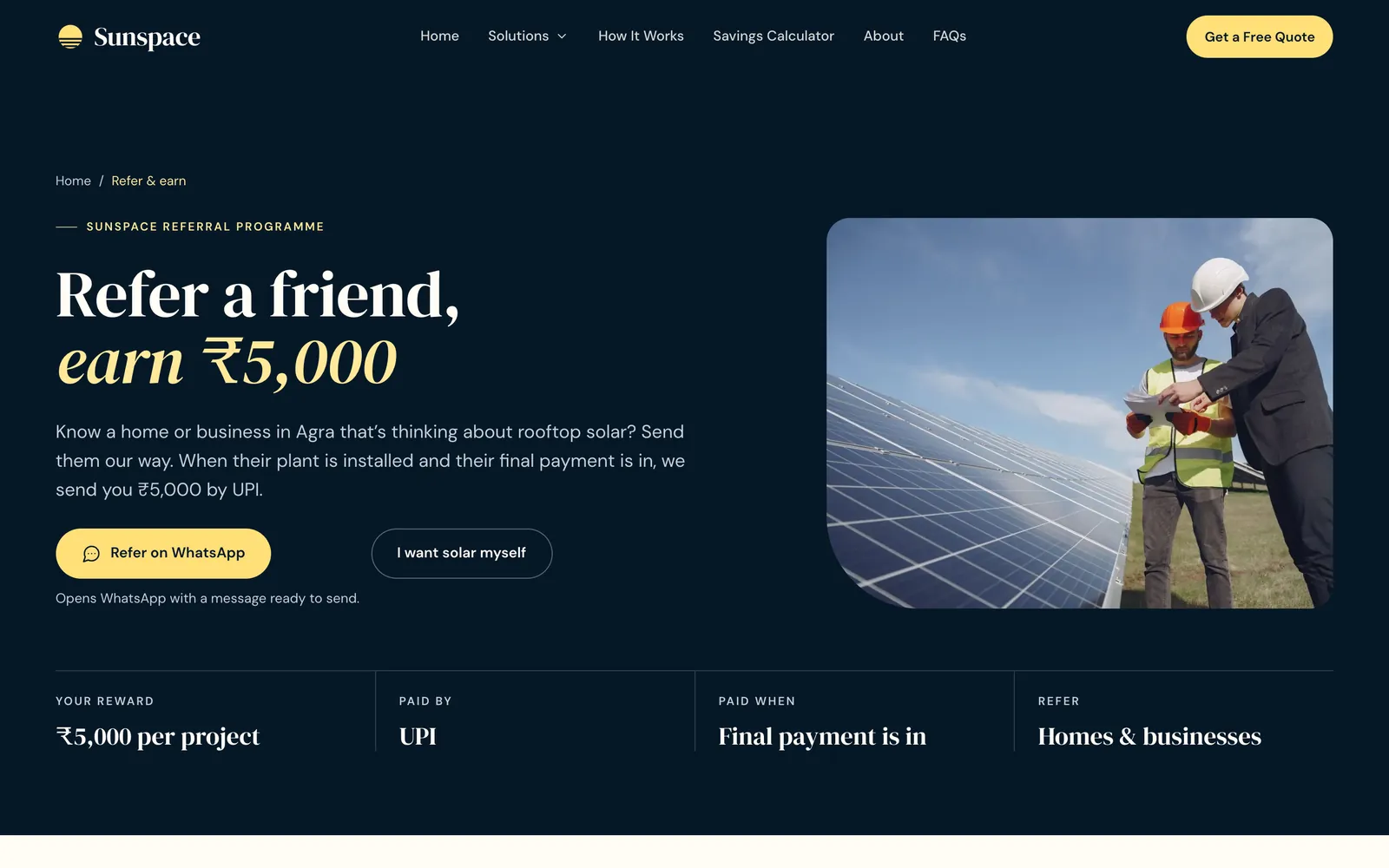
Run ads on Instagram. People show interest by messaging on WhatsApp and send leads our way. If a lead actually succeeds, they get ₹5,000.
The brief
The conventional design is a sign-up page with a personal referral link and a form for each friend. I sketched that first, then dropped it. The people this is for (past customers, friends, an Instagram audience) won't fill in forms, but they will send a WhatsApp message. On WhatsApp the phone number is the identity: it links the bot conversation, the lead, the project and the payout, with no accounts. Once a referred friend's number is attached to a project, the referrer gets WhatsApp updates on its progress.

Rules of the programme, and why
- Paid on the final payment, not at installation. Sunspace has the customer's money before it pays out. The reward moves from pending to due when “Final payment received” is ticked on the project (the referrer gets a WhatsApp message asking for their UPI ID), then to paid when an admin records the payout (and a confirmation goes out).
- A short counts / doesn't count list. Self-referrals, existing customers and addresses outside the service area are listed up front, so there are no arguments later.
- Open questions written onto the page. The terms carry a visible note to confirm with an accountant, and I flagged that payouts may need tax deducted at source (TDS).
The bot
Three options: Get solar (creates a lead), Refer a friend (signs the person up as a referrer, then turns a friend's name and number into a lead credited to them) and Talk to us (hands the chat to staff, and the bot goes quiet). A UPI ID the referrer sends is saved automatically. STOP and START control marketing messages, and “delete my data” flags the chat and pauses the bot.
| Meta's rule | How the product handles it |
|---|---|
| At most 3 buttons; button titles 20 characters or fewer; message bodies 1,024 characters or fewer | Checked in code: every message, in all three languages, is measured against the limits, and the app refuses to start in development if any message breaks one. |
| Free-form replies only within 24 hours of the customer's last message | After 24 hours the inbox shows that only templates are allowed now and suggests calling. Replying pauses the bot on that chat for 24 hours. |
| Business-initiated messages need approved templates | Three referral templates, submitted for review from the admin's WhatsApp page. |
| Version | Tone | What changed |
|---|---|---|
| v1 | Chatty | Typed answers, emojis and exclamation marks (“Namaste 🙏”, “Great!”) |
| v2 | Local | The first message asks for English, Hindi or Hinglish, and answers are mostly taps instead of typing |
| v3 | Calm | No emojis or exclamation marks, one question per message, and the tip on how to get back to the menu shown only once. The brief: “precise, clean, readable; it doesn't need to be loud”. |
Build or buy
WhatsApp tools like AiSensy and Interakt cost roughly ₹1,000–3,000 a month and keep chats in their own app. Building our own bot and inbox puts each chat next to the lead and the project it belongs to, which is the whole point of the referral flow. Setting up Meta is hard for a non-developer, so the admin's WhatsApp page includes a self-check: which settings are present or missing, what the access token can reach, whether Meta is reaching the webhook, whether the number is registered (with a form to register it using its PIN), and one-click linking. It turns a developer-only setup into a checklist the founder can follow.
What I chose, what I turned down, and why
| Decision | Options | Chosen, and why |
|---|---|---|
| Hosting | Vercel (its free plan bars commercial use; Pro is $20/month), Netlify, Render or Railway (~$5–7/month), Cloudflare Workers. GitHub Pages ruled out: it can't run the lead API. | Netlify first, then Cloudflare once Netlify's free tier showed its own badge over the live site. Cloudflare also puts DNS, hosting, file storage and email records in one free account. |
| Where leads go | A Google Sheet via Apps Script, Make.com, email only, a database | MongoDB Atlas (free tier, Mumbai region) plus an email alert, sent in parallel. The sheet was blocked by the account. |
| Founder-editable content (CMS) | Sanity, Payload, Keystatic or Tina | Cut. All copy lives as typed data files, so a CMS can be added later without touching components. In practice the founder needed the workspace, not page editing. |
| Staff tool | An /admin section on the website, or a separate app | A separate app. The public site only writes leads, and the staff tool can change daily without risking it. |
| Document storage | Cloudflare R2, Google Drive, Amazon S3 | R2: private, no download fees, 10 GB free, no keys to manage. Drive would show ID and bank documents to anyone with folder access, and S3 meant a new AWS account billed in dollars. |
| Lifecycle scope | Up to handover, or through after-sales | Through after-sales: that is where the service work, the reviews and the referral payouts happen. |
| Release process | Pull requests, or pushing straight to main | Straight to main: one builder and no reviewers to wait on, so every change was instead tested locally against test data before it went out. Cloudflare deploys on each push. |
Password hashing is heavy work for a Worker. On Cloudflare's free plan (about 10 ms of CPU per request) sign-in can fail with error 1102. I flagged the $5/month Workers Paid plan as the fix if it shows up, rather than weakening the hashing.
An AI build team, with the judgement kept in-house
I worked as the PM and directed Claude Code as the engineering team. The leverage came from running work in parallel; the quality came from testing before every release and reviewing everything myself.
- Design first. The visual system and pages were designed in Claude Design, then turned into code with the design's exact field rules and messages.
- Parallel builds. On day one, five agents worked side by side on the lead form and API, the calculator and planner, the 3D home, the solution pages and the legal pages. Two more built the Agra page and the guides, and separate sessions handled the lead pipeline and the referral page.
- Testing before each release. Every feature ran against a throwaway local database on Cloudflare's own runtime before it was pushed: 13 checks for the first leads page, 16 for splitting off the workspace, 38 for accounts, 78 for the lead pipeline, 55 for projects and 24 for the WhatsApp bot. Bugs got their own stress tests, such as 80 leads with 17 rapid filter clicks for the quick-view crash.
- A register of every integration. At handover the founder got a spreadsheet of all 24 services: 17 live, 4 in progress, 1 needing a setting and 2 not set up. It also listed every server setting by name (never the value), the 11 workspace modules, all 17 pages with their indexing status, the 11 analytics events and the open to-dos.
What's live, and how I'd judge it
The site, calculator, Agra pages, referral page and workspace are live. WhatsApp is waiting on Meta (switching the app to Live, and template review). Search Console and the Google Business Profile are in progress. The 11 analytics events are wired up, but GA4 isn't connected yet. So there are no outcome numbers yet, and I'm not going to invent any. Sample impact figures and testimonials carry a visible “sample” label until the founder supplies real ones.
The first 90 days: what I'd watch
| Question | Metric | Already captured by |
|---|---|---|
| Which marketing works? | Leads a week, and the won rate, by source button and campaign | Form source + ad tags |
| Does the calculator earn its place? | Share of leads with an estimate attached, and how they convert compared with leads without one | Estimate saved on the lead |
| Is sales fast enough? | Time from a lead arriving to its first status change | Activity log |
| Why do we lose? | Lost vs not-a-fit vs cancelled, with reasons | Side exits with reasons |
| Do referrals scale? | Referral share of won projects; days from final payment to payout | Referral states |
| Where do projects stall? | Days spent in each stage, net metering split by electricity company | Derived stages + project records |
Five things I'd do again
- Let constraints set the scope. “Don't build an admin” was the right first answer. The blocked sheet, the employees and the paperwork each earned the next step.
- The user's channel beats my form. Dropping the referral-link design for WhatsApp-only made the programme usable for the people it's for. My job was making it work within Meta's rules.
- Calculate state; don't ask people to keep it up to date. A stage derived from the checklist ended a whole category of stale-status problems.
- Investigate before building. The “personal number” bug was test data. Checking first saved a fix that would have broken something that worked.
- Speed you can feel is a feature. “It takes a second” is a product complaint, not a technical one. Prefetching, cancelling stale requests and merging saves fixed it.